
Once you reach Level 20, you can join a Guild.
By joining a Guild, you can build a community and grow together with like-minded Guild members.
You can access Guild features through the Guild menu on the right side of the screen.
1. Joining and Creating a Guild
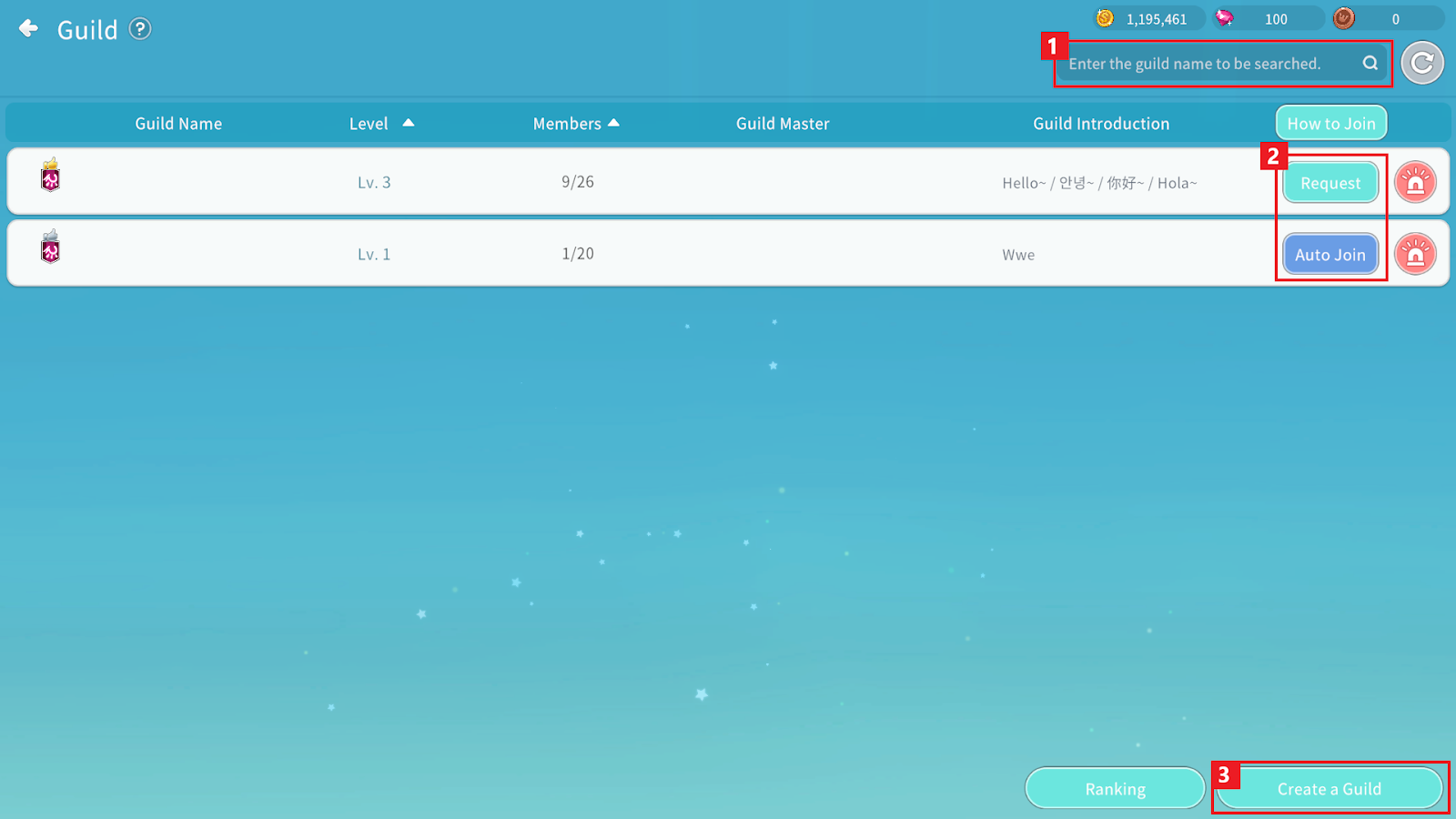
① If you want like to join an existing Guild, you can search for the Guild by entering its name.
② How to join
-Request: If approval is required, you may submit a join request. Once a Guild member with the appropriate authority approves it, you will automatically join the Guild.
-Auto Join: If the Guild allows automatic entry, you will join immediately upon applying.
③ You can create a Guild and become the Guild Master. Creating a Guild requires 100,000 Cegel.
2. Guild Home
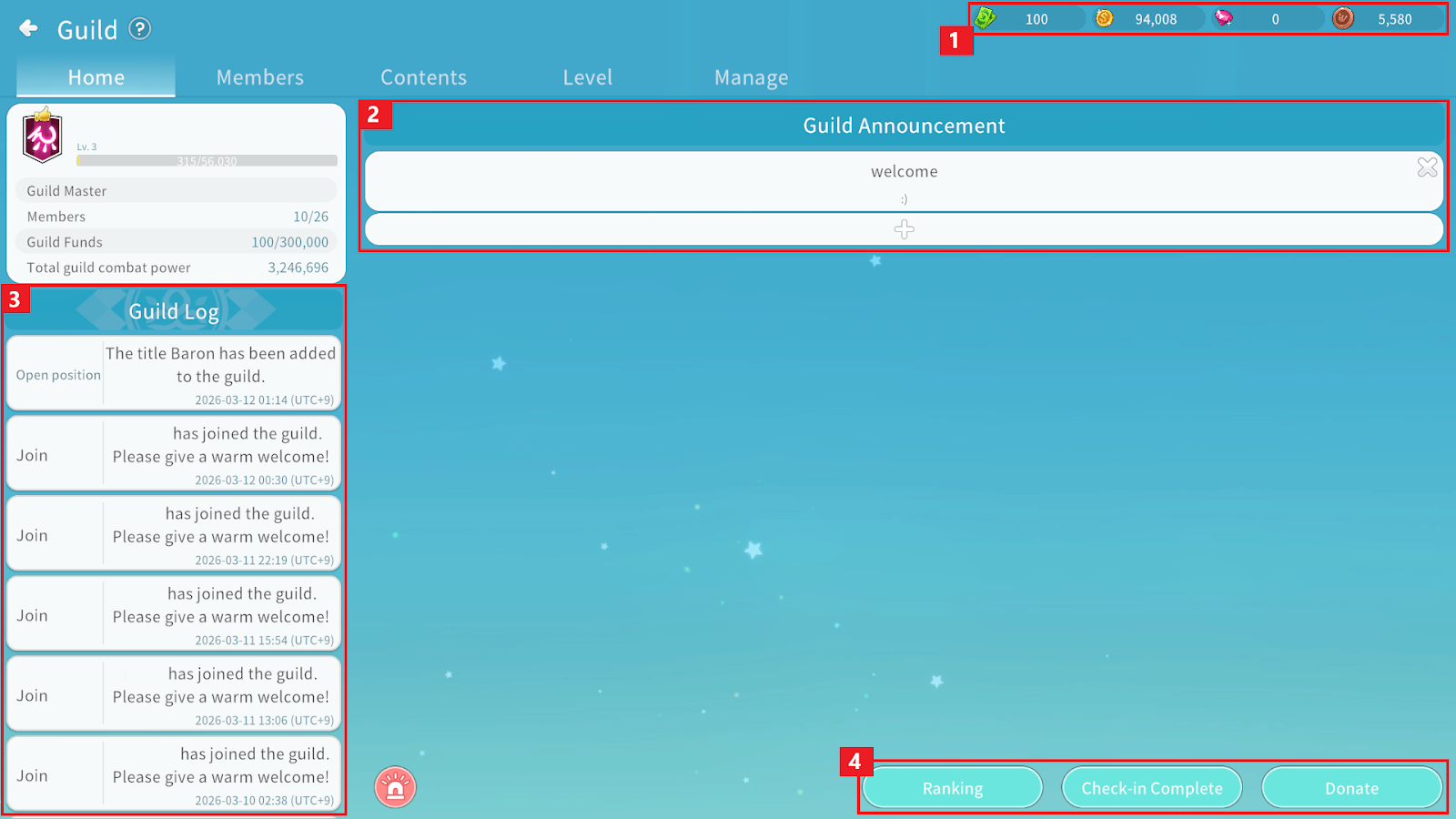
① You can check the Guild funds and the number of Guild Coins currently held by your character.
② You can register and delete Guild notices. Only the most recent notice will be displayed in the notice list.
③ You can view the Guild log, including member joins and title (position ) changes.
④ You can access Guild Ranking, Check-in, and Donate.
3. Guild Members
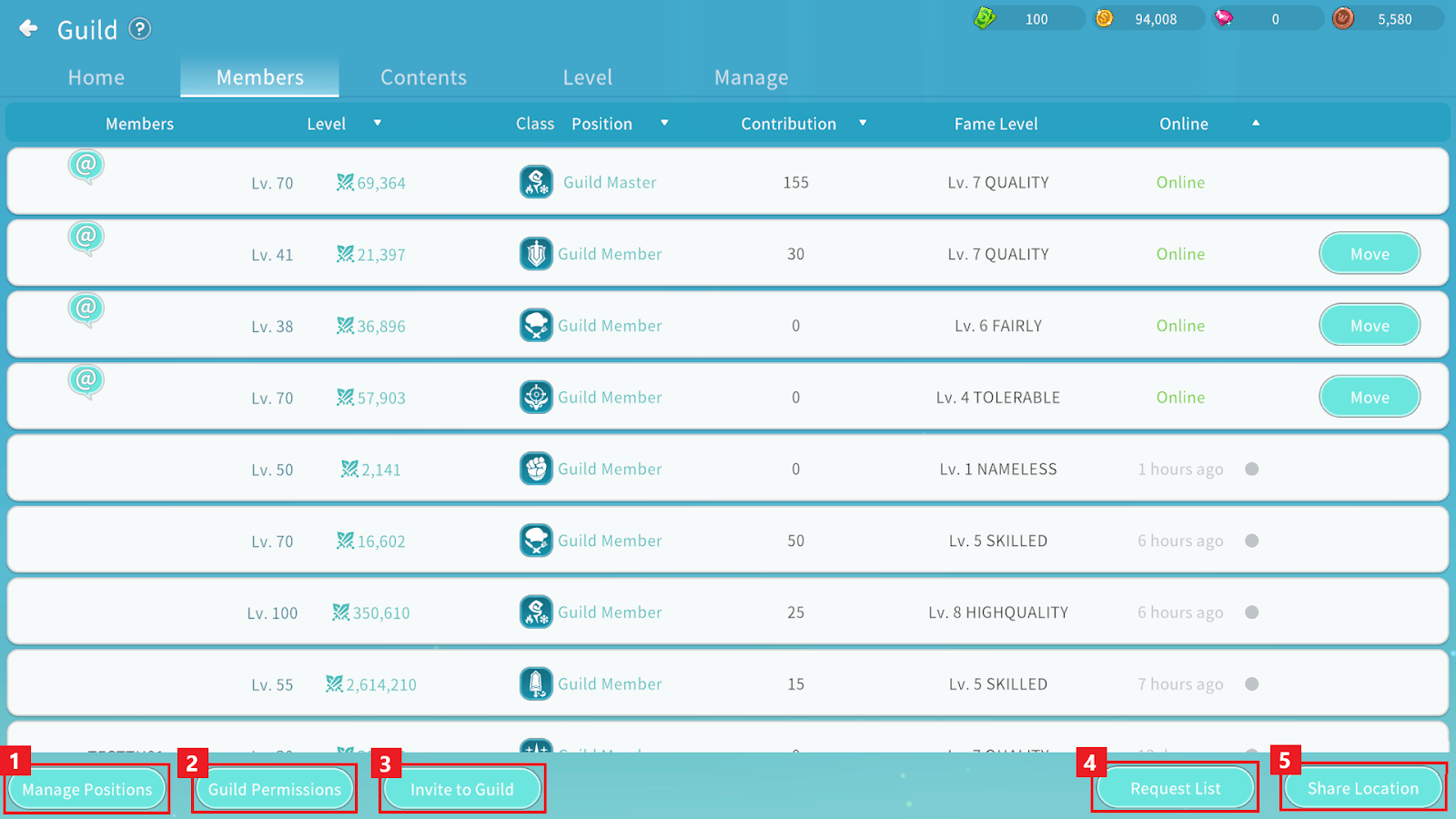
In the Members menu, you can view all members belonging to the Guild.
3-1. Manage Positions
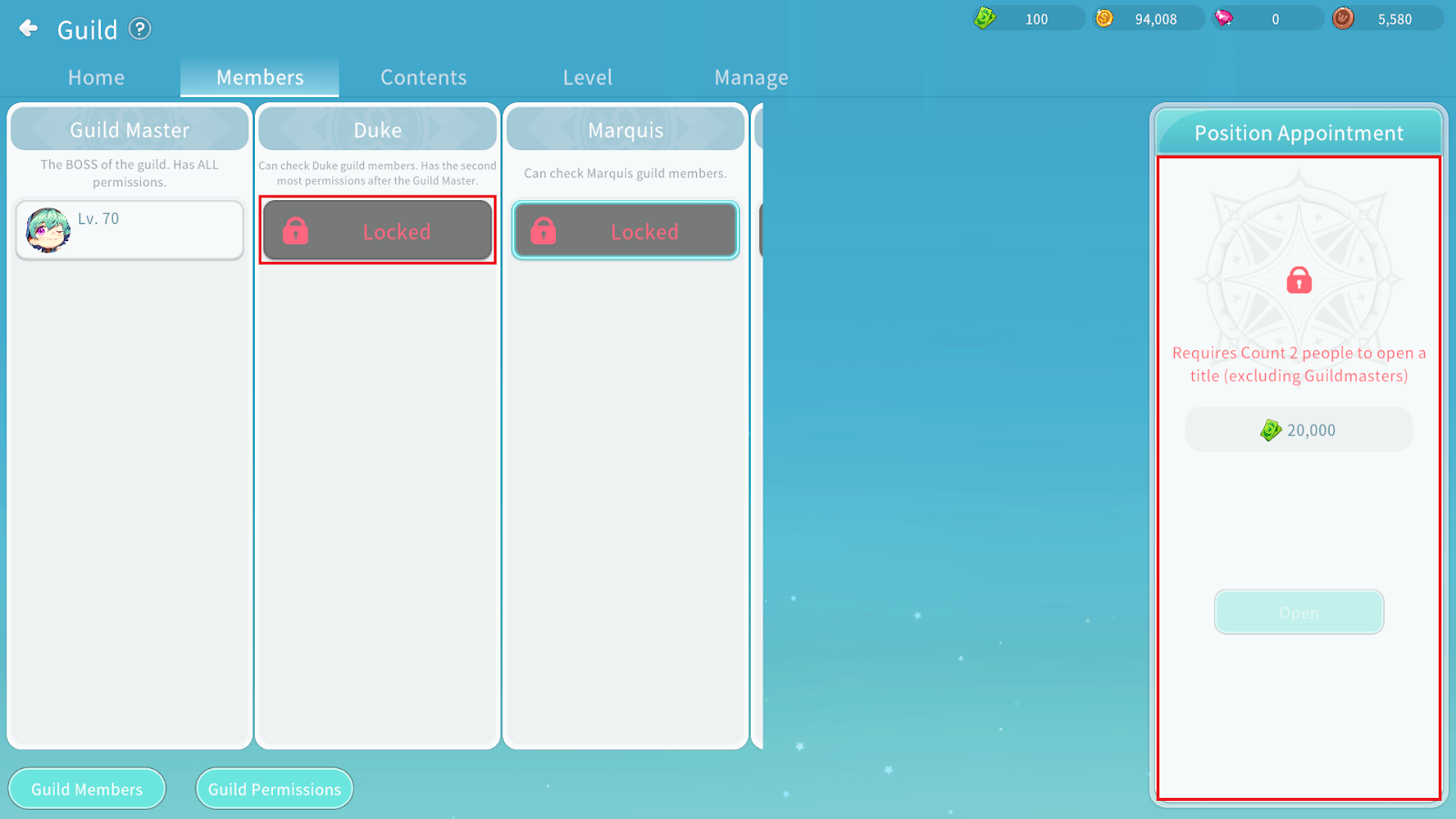
Guild positions include: Guild Member, Baron, Count, Marquis, Duke, and Guild Master.
When the position unlock conditions are met, you can unlock the position by spending the required Guild funds.
Each position has different unlock conditions and required funds. If a position cannot be unlocked, tapping it will display its unlock requirements.
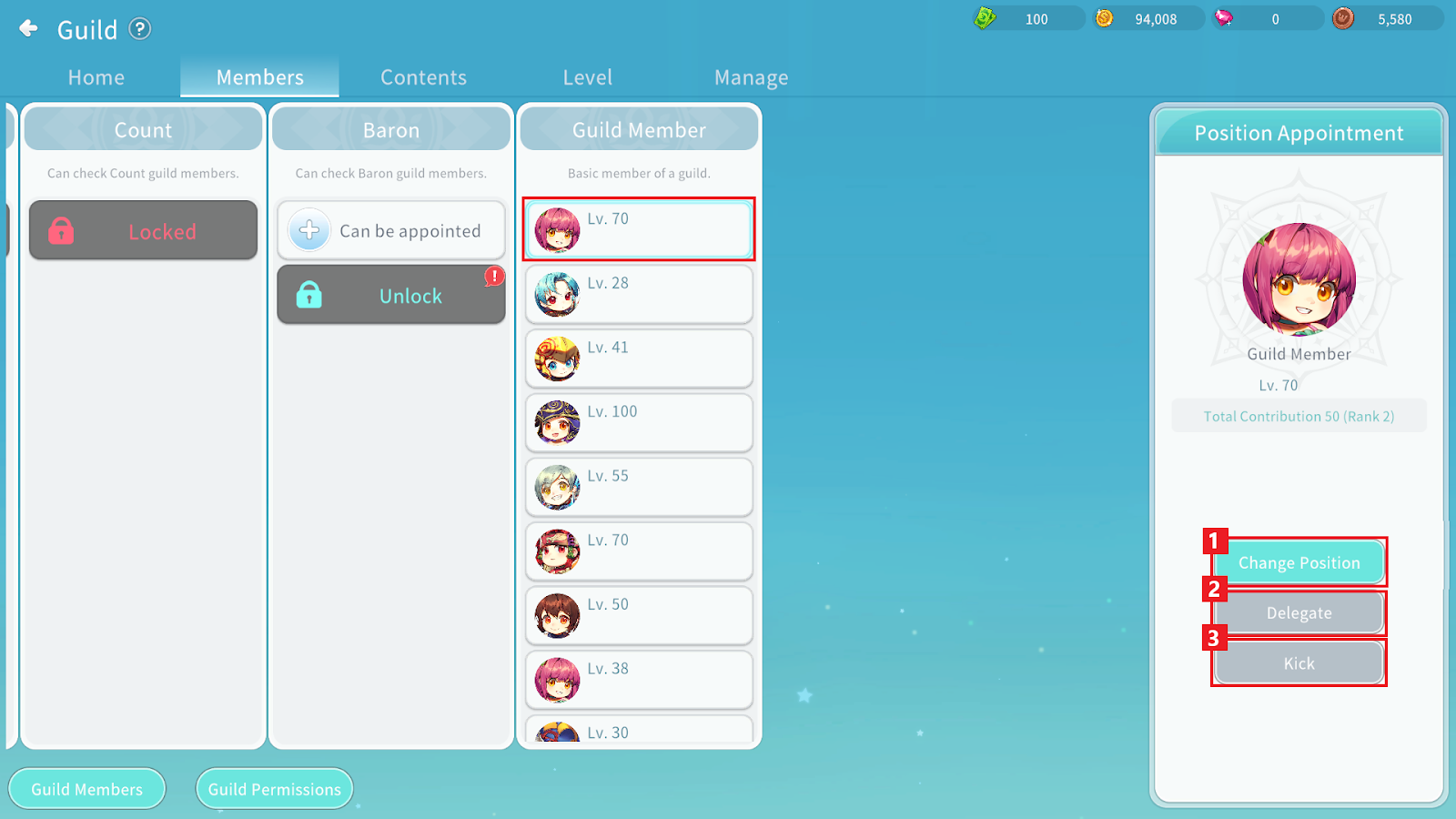
① You can change the position of the selected Guild member.
② You can transfer Guild Master authority to the selected Guild member.
- Please note that once delegated, you will immediately lose Guild Master authority.
③ You can kick the selected Guild member from the Guild.
- A kicked member receives the same penalty as a member who voluntarily leaves the Guild.
- The Guild’s contribution score will decrease by the amount of contribution earned by the expelled member.
3-2. Guild Permissions
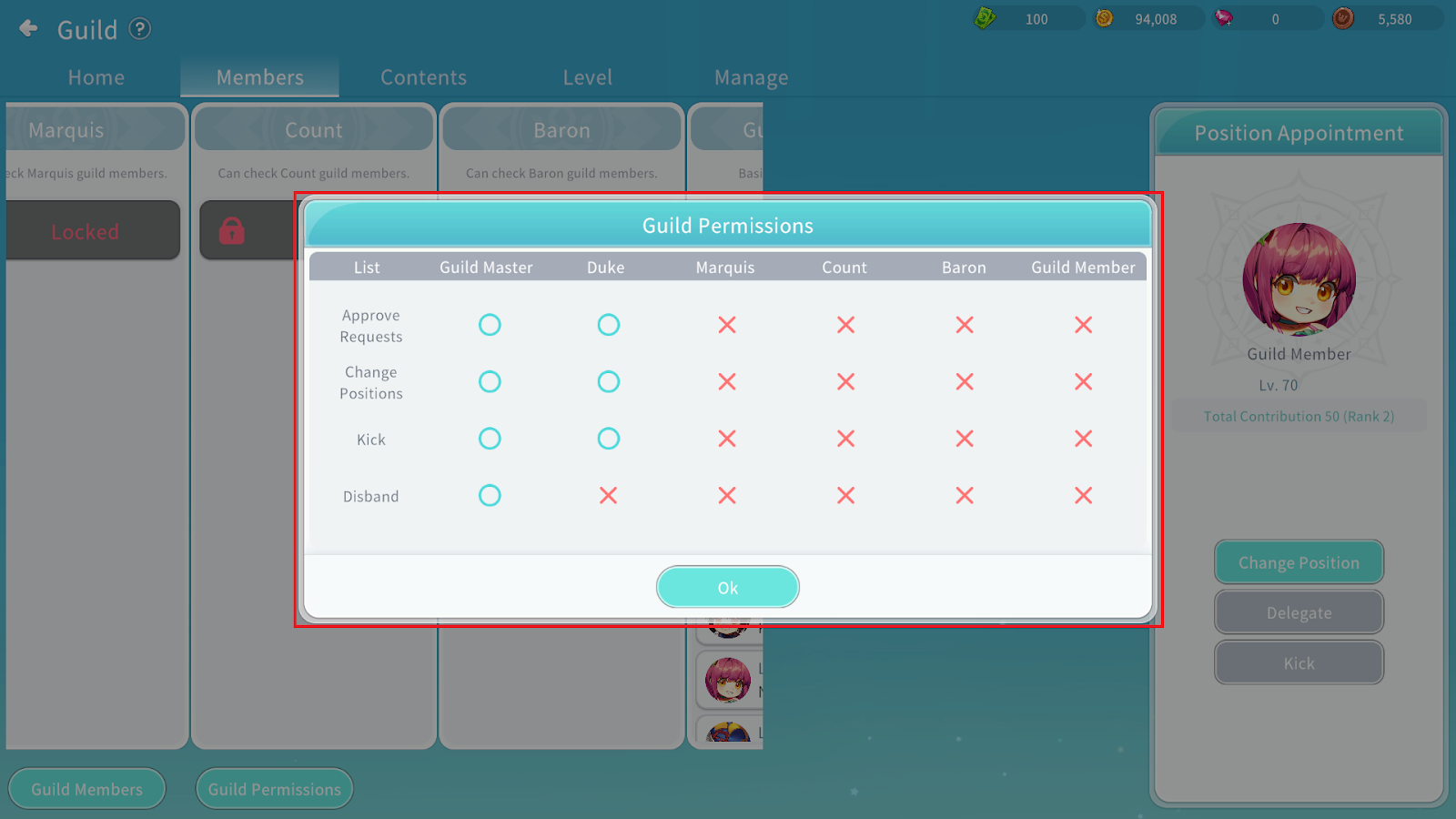
You can check the permissions assigned to each position .
3-3. Guild Invitation
You can invite an adventurer to the Guild by entering their nickname.
3-4. Join Request Status
For Guilds that require manual approval, you can accept or reject join requests in this menu.
This menu is not visible to regular Guild members.
3-5. Location Sharing
You can share your current location in the Guild window.
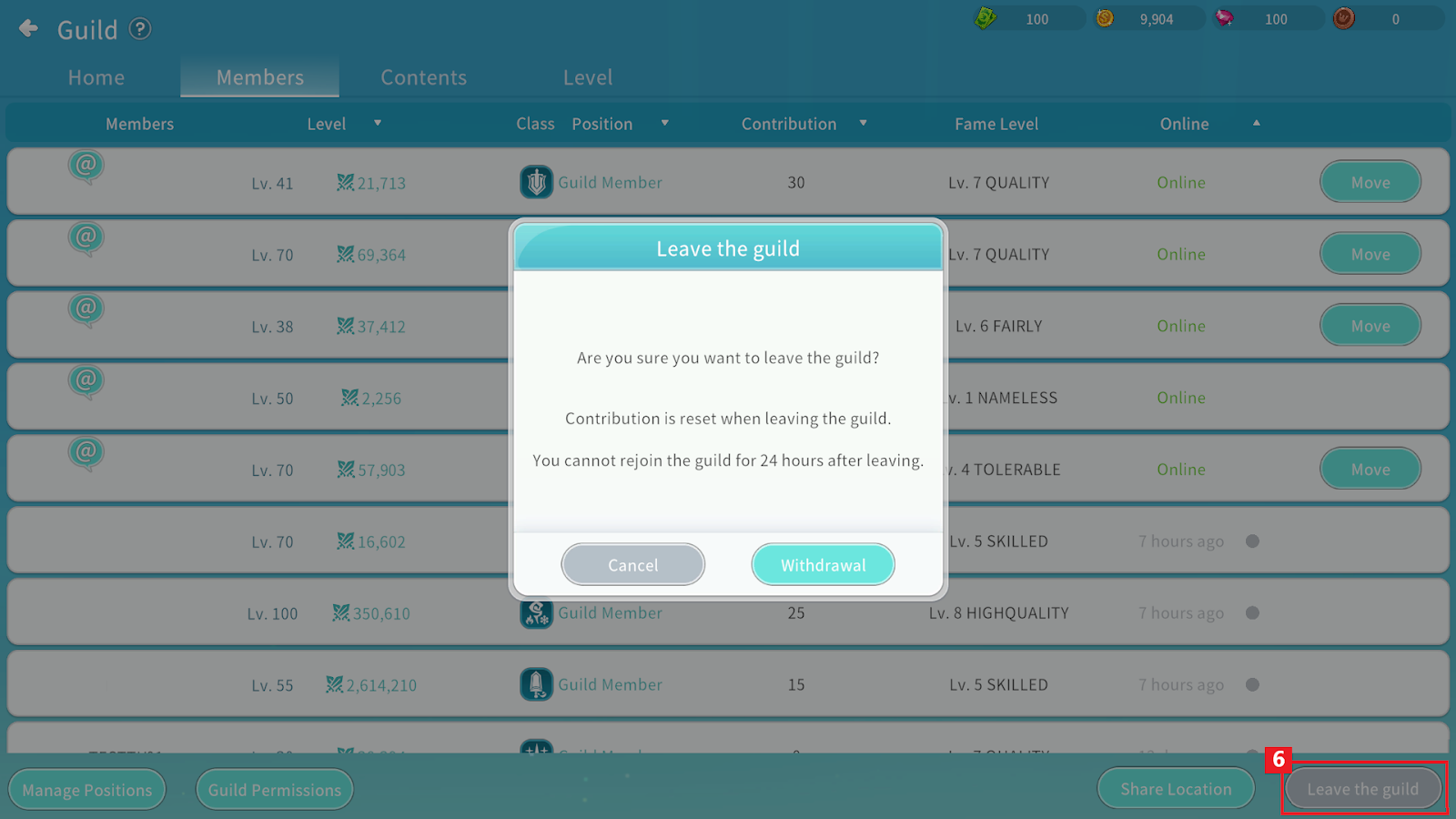
3-6. Leave Guild
Guild members can use the Leave Guild button to withdraw from the Guild.
When leaving the Guild, your contribution will be reset and you will not be able to join another Guild for 24 hours.
The Guild’s total contribution will decrease by the amount of contribution you had accumulated.
※ Automatic Guild Master Delegation
- If both the Guild Master and Vice Guild Master are inactive for 7 consecutive days, Guild Master authority will be automatically transferred.
- Authority will be transferred to the Guild member (excluding the Guild Master and Vice Guild Master) with the highest contribution.
4. Guild Content
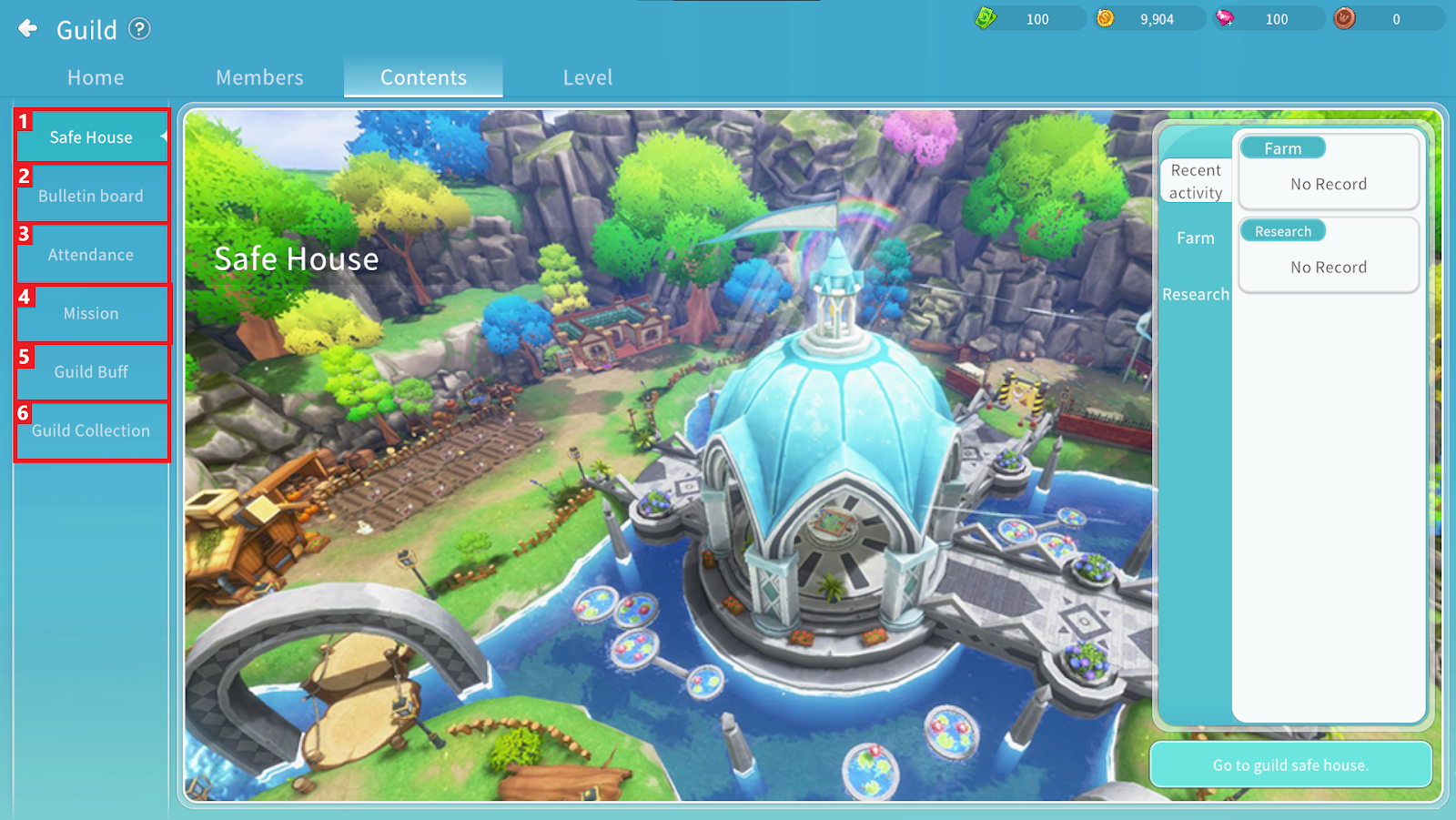
① You can obtain materials required for Guild Buffs and use them to enhance buffs.
② You can check the weekly Guild contribution position ing and receive rewards based on position ing.
(Rewards: Guild Coin, Sapphire)
③ You can check daily attendance status of Guild members.
④ Depending on the Guild level, mission difficulty and the contribution and Guild Points earned upon completion will vary.
⑤ You can unlock or activate Guild Buffs.
⑥ This is a Guild-wide collection activity. When missions are completed, items can be obtained as rewards.
You can check the progress status of each Guild Content category. Content is unlocked according to the Guild level.
Guild content | ||||
Guild Safe House | Bulletin Board | Mission | Guild Buff | Guild Collection |
Guild Level 3 | Guild Level 2 | Guild Level 2 | Guild Level 2 | Guild Level 3 |
Guild Level Information Guide
Guild Level Contribution Details | ||||
Guild Level | Cumulative Experience | Max Guild Members | Attendance Contribution | Mission Contribution |
1 | 200 | 20 | 5 | - |
2 | 8,120 | 23 | 10 | 10 |
3 | 64,150 | 26 | 15 | - |
4 | 184,180 | 30 | 20 | 60 |
5 | 671,810 | 35 | 30 | - |
6 | 1,747,210 | 40 | 40 | 170 |
7 | 3,733,460 | 45 | 50 | - |
8 | 7,012,660 | 50 | 70 | 250 |
9 | 12,022,930 | 50 | 90 | - |
10 | 19,256,180 | 50 | 110 | 300 |
Contribution can be obtained through Guild Attendance and Guild Missions.
Guild Safe House
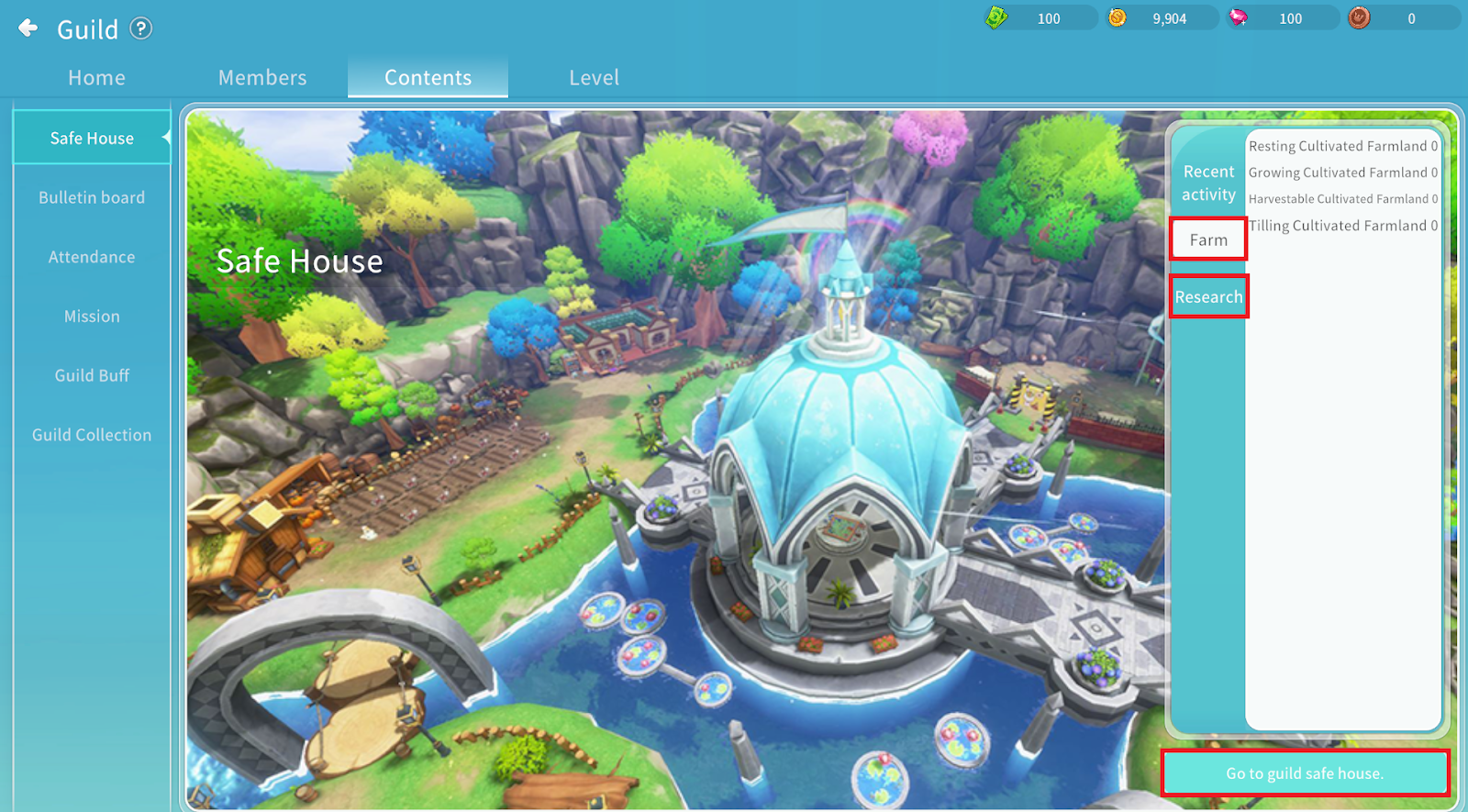
You can move to the Guild Safe House to carry out Farming and Research activities.
4-1. Guild Farm
By cultivating farmland, you can harvest research materials required for Guild Research.
A total of 10 plots of farmland are available. Once a plot is unlocked, it can be used permanently.
(Unlocking each plot requires 12,000 Guild Funds.)
After unlocking a plot, you can plant seeds and grow them up to Stage 3 to obtain harvestable materials.
Guild Farm – Stage Requirements
Farm Stage | Required Currency | Required Cost (Qty) | Eligible Rank | Notes |
Unlock Farmland | Guild Funds | 12,000 | Guild Master, Duke | - |
Plant Seeds | Ripe Eco Fan Fruit | 1 | Guild Member | Obtainable from Eco Fan’s Map |
Stage 1 Growth | Guild Token | 2,000 | Guild Member | - |
Stage 2 Growth | Guild Token | 2,000 | Guild Member | - |
Stage 3 Growth | Guild Token | 2,000 | Guild Member | - |
Harvest | - | - | - | Randomly obtain Lemon, Pumpkin, Peanut, or Mushroom |
Farm Harvest Rates
Crop Type | Rate | Quantity Obtained |
Fresh Lemon | 20% | 2 |
Flat Pumpkin | 20% | 2 |
Water-Soaked Peanut | 30% | 2 |
Chocolate-Coated Mushroom | 30% | 4 |
※ Harvested crops are granted equally to all Guild members, including the member who performs the harvest.
(Example: If 2 Lemons are harvested, all Guild members receive 2 Lemons.)
4-2. Guild Research
You can research Guild Buffs through the Guild Researcher NPC Primrose in:
Guild Safe House > Guild Researcher NPC Primrose
Materials Required by Buff
Level 0 Unlock: Can be unlocked via Guild Content > Guild Buff.
Level 1 and above: Can be unlocked through Guild Content > Guild Buff > Guild Research.
Once research is completed using the required materials, the corresponding buff level can be used.
Guild Buff Research (Offensive Type) | ||||
Buff Effects | Buff Level | Buff Unlock | Material 1 | Material 2 |
Guild Funds | Fresh Lemon | Chocolate-Coated Mushroom | ||
Increase Physical Attack
Increase Magic Attack
Increase All Damage | 0 | 2000 | - | - |
1 | 2000 | 1850 | 4700 | |
2 | 2500 | 1850 | 4700 | |
3 | 3000 | 2770 | 7100 | |
4 | 3500 | 2770 | 7100 | |
5 | 4000 | 2770 | 7100 | |
6 | 4500 | 2860 | 7300 | |
7 | 5000 | 2860 | 7300 | |
8 | 5500 | 2860 | 7300 | |
9 | 6000 | 3430 | 8700 | |
Guild Buff Research (Defense Type) | ||||
Buff Effects | Buff Level | Buff Unlock | Material 1 | Material 2 |
Guild Funds | Flat Pumpkin | Chocolate-Coated Mushroom | ||
Increase Physical Defense
Increase Magic Defense
Decrease All Damage | 0 | 2000 | - | - |
1 | 2000 | 1850 | 4700 | |
2 | 2500 | 1850 | 4700 | |
3 | 3000 | 2770 | 7100 | |
4 | 3500 | 2770 | 7100 | |
5 | 4000 | 2770 | 7100 | |
6 | 4500 | 2860 | 7300 | |
7 | 5000 | 2860 | 7300 | |
8 | 5500 | 2860 | 7300 | |
9 | 6000 | 3430 | 8700 | |
Guild Buff Research (Support Type) | ||||
Buff Effects | Buff Level | Buff Unlock | Material 1 | Material 2 |
Guild Funds | Water-Soaked Peanut | Chocolate-Coated Mushroom | ||
MP Recovery Increase EXP | 0 | 2000 | - | - |
1 | 2000 | 2500 | 4700 | |
2 | 2500 | 2500 | 4700 | |
3 | 3000 | 3800 | 7100 | |
4 | 3500 | 3800 | 7100 | |
5 | 4000 | 3800 | 7100 | |
6 | 4500 | 3900 | 7300 | |
7 | 5000 | 3900 | 7300 | |
8 | 5500 | 3900 | 7300 | |
9 | 6000 | 4700 | 8700 | |
Guild Buff Guide by Guild Level
Guild Buff Availability by Guild Level | |||||||||
Guild Level | Physical Attack Increase | Magic Attack Increase | MP Potion Recovery Rate | EXP Increase | Physical Defense Increase | Magic Defense Increase | All Damage Reduction | All Damage Increase | Growth Status |
1 | - | - | - | - | - | - | - | - | - |
2 | 3~6% | 3~6% | 5~11% | - | - | - | - | - | ✓ |
3 | - | - | - | - | - | - | |||
4 | 5~11% | - | - | - | - | ✓ | |||
5 | - | - | - | - | - | ||||
6 | 5~9% | 5~9% | - | - | ✓ | ||||
7 | - | - | - | ||||||
8 | 5~9% | - | ✓ | ||||||
9 | - | - | |||||||
10 | 3~6% | ✓ | |||||||
Buff Effects
Guild Buffs can be activated through: Guild Content > Guild Buff > Guild Coin. Each level provides different effect values and duration.
Guild Buff Effects by Guild Level (Offensive Type) | ||||
Buff Effects | Buff Level | Effect Value | Buff Duration (min) | Required Guild Coins |
Increase Physical Attack
Increase Magic Attack
Increase All Damage | 0 | 3% | 120 | 500 |
1 | 3.20% | 160 | ||
2 | 3.40% | 200 | ||
3 | 3.70% | 240 | ||
4 | 4% | 300 | ||
5 | 4.30% | 360 | ||
6 | 4.70% | 420 | ||
7 | 5.10% | 480 | ||
8 | 5.50% | 540 | ||
9 | 6% | 600 | ||
Guild Buff Effects by Guild Level (Defensive Type) | ||||
Buff Effects | Buff Level | Effect Value | Buff Duration (min) | Required Guild Coins |
Increase Physical Defense
Increase Magic Defense
Reduce All Damage | 0 | 5% | 120 | 500 |
1 | 5.30% | 160 | ||
2 | 5.60% | 200 | ||
3 | 6% | 240 | ||
4 | 6.40% | 300 | ||
5 | 6.80% | 360 | ||
6 | 7.30% | 420 | ||
7 | 7.80% | 480 | ||
8 | 8.30% | 540 | ||
9 | 9% | 600 | ||
Guild Buff Effects by Guild Level (Support Type) | ||||
Buff Effects | Buff Level | Effect Value | Buff Duration (min) | Required Guild Coins |
MP Potion Recovery Rate
EXP Increase | 0 | 5% | 120 | 500 |
1 | 5.40% | 160 | ||
2 | 5.80% | 200 | ||
3 | 6.40% | 240 | ||
4 | 7% | 300 | ||
5 | 7.60% | 360 | ||
6 | 8.40% | 420 | ||
7 | 9.20% | 480 | ||
8 | 10% | 540 | ||
9 | 11% | 600 | ||
