Main Screen

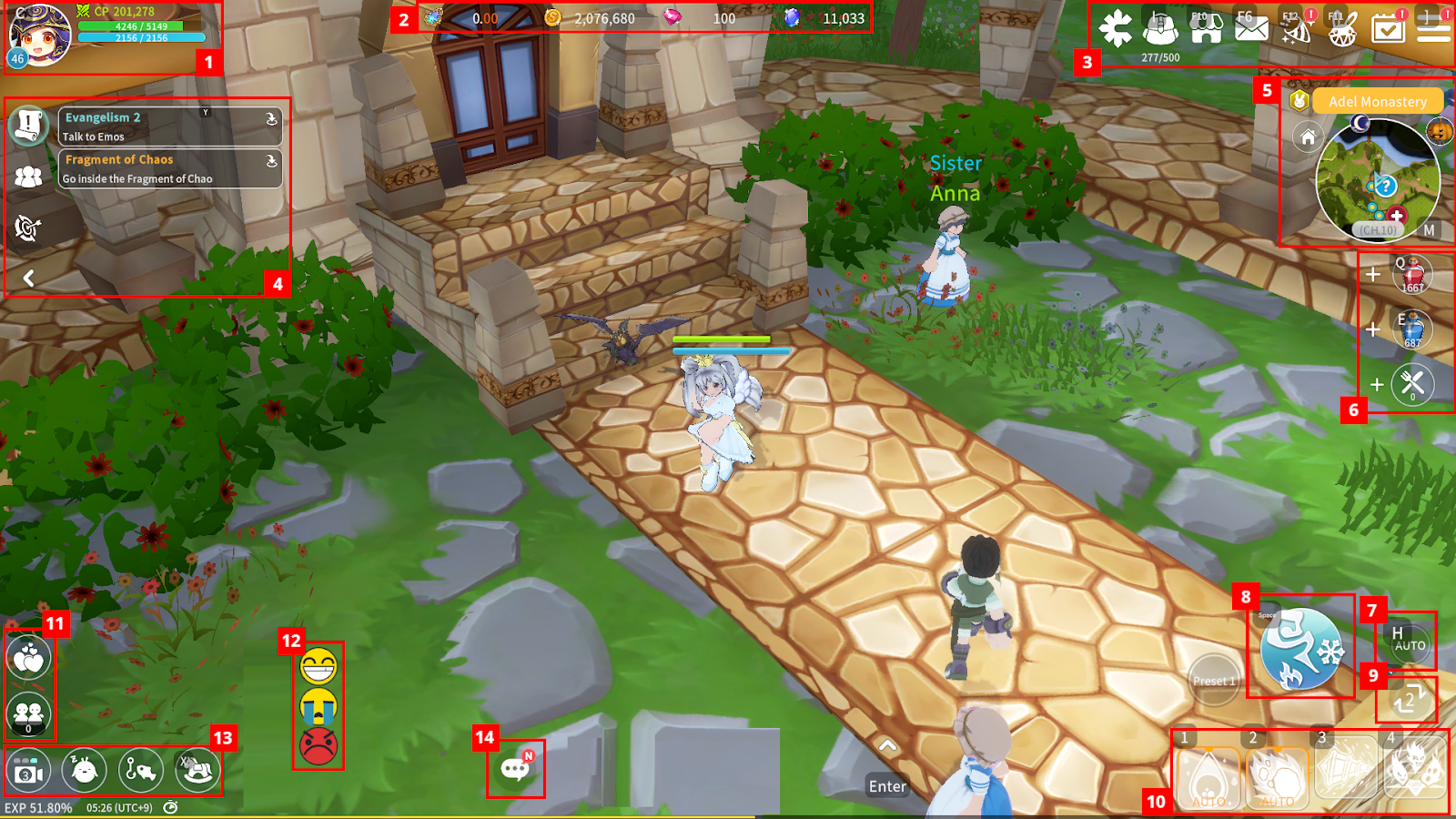
① You can check your character’s Level, Combat Power, HP, and MP. Tap the character portrait to view detailed information.
② You can check your currently held Currency.
③ You can move to Cross, Bag, Shop, Mail, Events, Summon, Missions, and open the full Menu.
④ You can check current Quests, Party status, and nearby targets.
⑤ You can access the Mini-map, change Channel, and return to Town. Tap the Mini-map to open the World Map.
⑥ You can use HP and MP Potions, and switch the type of Potion.
⑦ You can toggle Auto Battle ON/OFF.
⑧ You can initiate attacks or use Combos.
⑨ You can change the Combo Mode.
⑩ You can check Skills registered in the Quick Slot.
⑪ You can check Couple and Friends
⑫ You can use emotes to interact.
⑬ You can change the camera perspective, enter Sleep Mode, start Fishing, and mount or dismount your Guarder
⑭ You can open the Chat window.
