Main screen
Main screen
On the main screen, you can check various information necessary for gameplay and use UI functions.
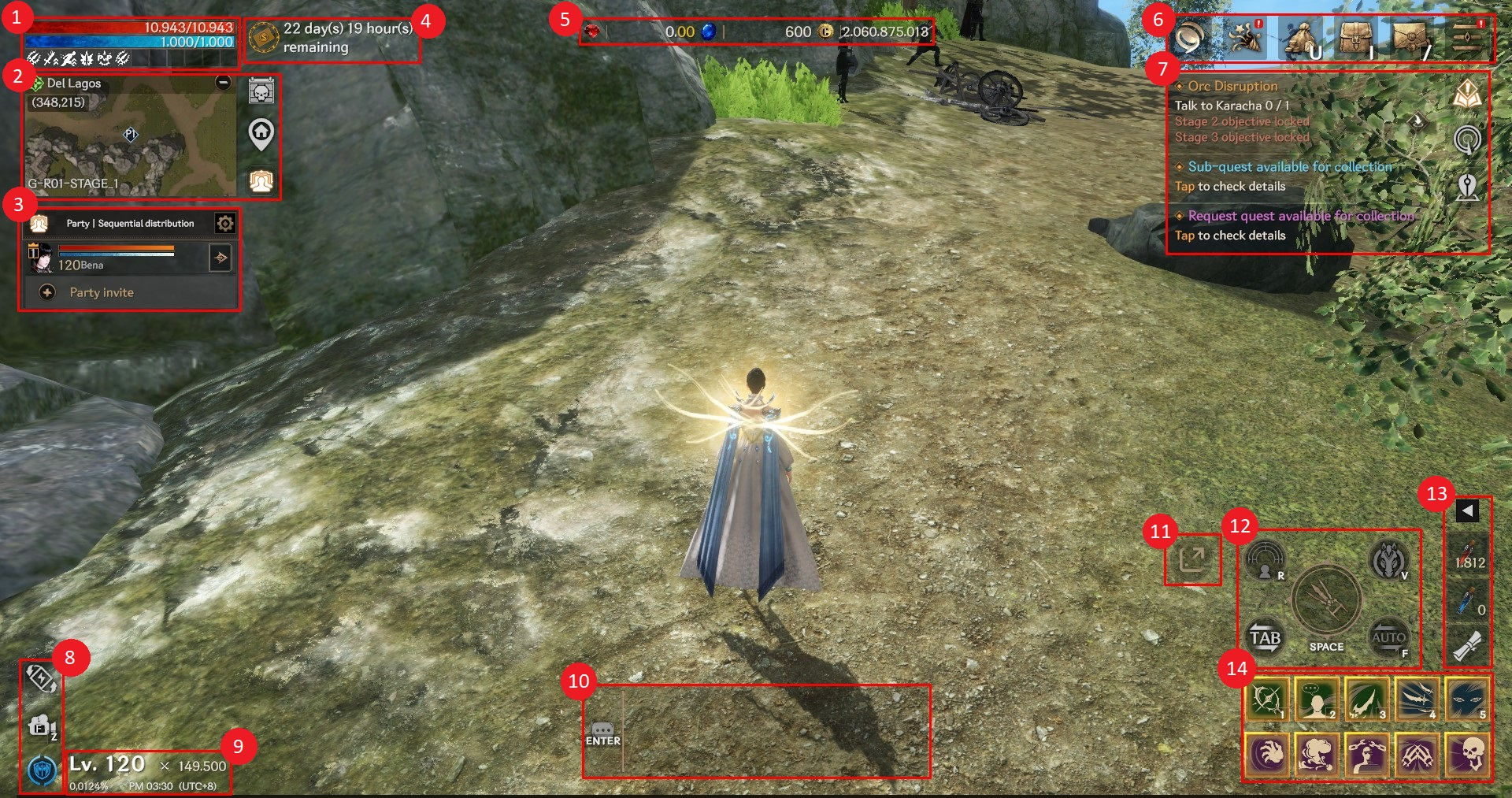
① You can check the character’s HP/MP and buff status.
② You can check the regional/world map, boss status board or use base resurrection and party functions.
③ You can check the party status.
④ You can check the remaining subscription time.
⑤ You can check your Ruby, Sapphire and Cron holdings.
⑥ You can check the events, NEXT market, cash shop, inventory, mailbox, and menu by clicking/touching the icons.
⑦ You can check the status of quests, scans, and location saves by clicking/touching the icons.
⑧ You can enter power saving mode, change camera viewpoint, and check causality status.
⑨ You can check the character's level/combat power/experience rate and the current time.
⑩ You can check the chat in the mini chat window. When you click/touch the mini chat window, the main chat window will be displayed.
⑪ You can use the party target sharing function.
⑫ You can execute attack, scan, target switching, mount, and auto-hunt functions.
⑬ You can register/unregister items in the quick slot.
⑭ You can use the skill manually by clicking/touching the skill icon registered in the skill slot. If you drag the icon down, the automatic use setting for the skill will be switched to registered/deregistered status.