[Club Battle]

Club Battle is a competitive mode where Clubs go head-to-head for honor and ranking.
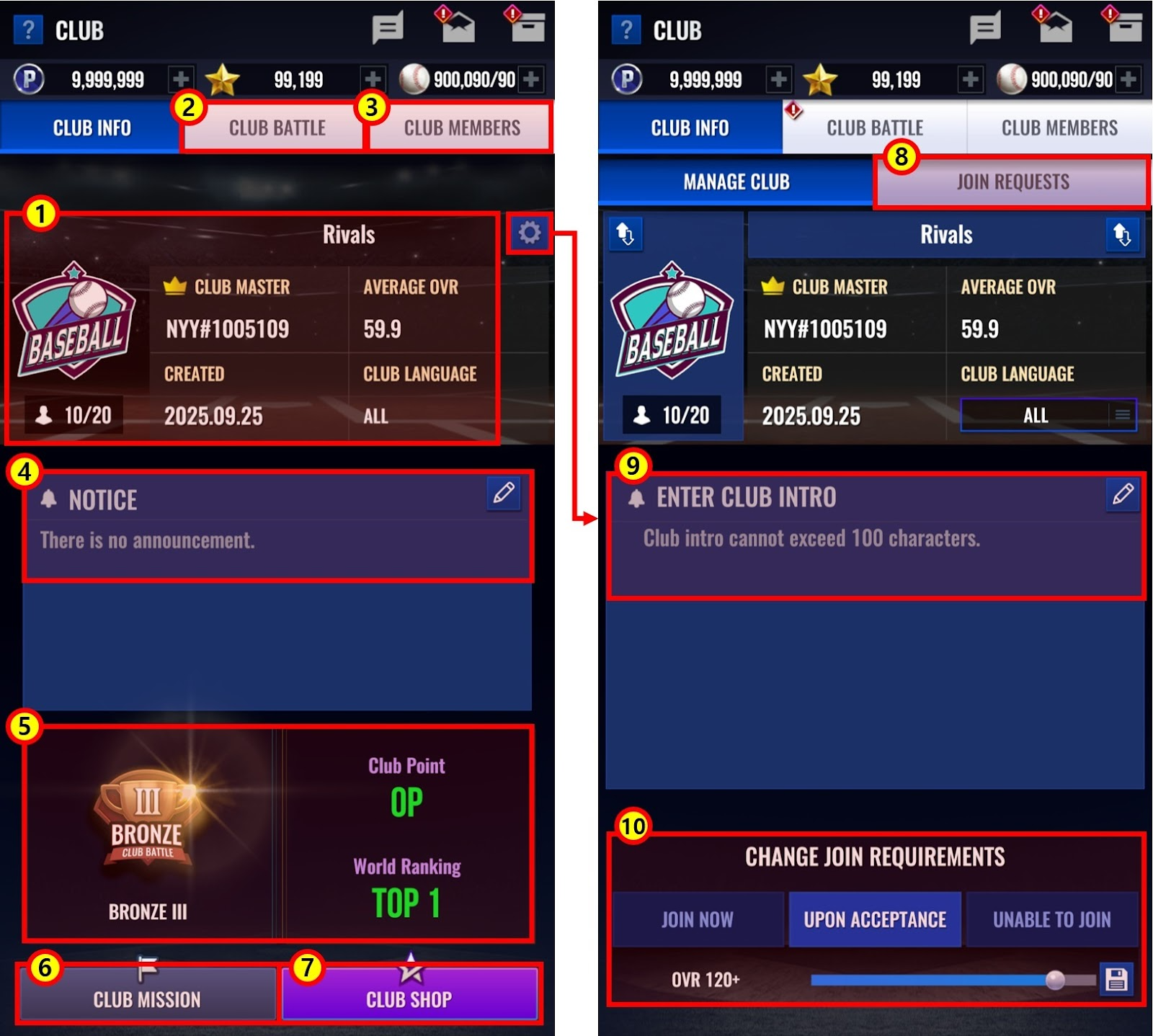
① View information about your Club.
② Enter and play in Club Battles.
③ Check the current list of Club Members.
④ Read the latest Club Notices.
⑤ Check Club Points and Ranking Tier for the current Season.
⑥ Check ongoing Club Missions.
⑦ Access the Club Shop.
⑧ Review users applying to your Club.
⑨ Write or edit your Club Introduction.
⑩ Change your Club’s Join Conditions.
1. Participation Requirements
- Only Clubs with 10 or more members can participate in Club Battle.
- Your Club must have at least 10 members at least 2 hours before the Club Battle begins.
* If your Club fails to meet the minimum member requirement after joining the Club Battle season, it will be penalized and automatically lose the round with a default score of a 40-point gap.
- Club Battle matchmaking is based on Club Points (CP).
2. Tier System
- Your Club’s Tier and World Ranking are determined based on its current Club Points.
- Club Points can be earned by winning Club Battle Rounds.
- Reaching certain Club Point milestones will increase the Club Tier and grant rewards.
- At the start of a new season, Club Points will be adjusted based on the results of the previous season.
- Clubs participating in Club Battle for the first time will start with 1,000 CP (Bronze III), and CP will not drop below 1,000.
- Newly created Clubs that have never participated in a Club Battle will begin the season at the Unranked Tier.
* During the Preseason, Clubs can reach up to Diamond I Tier.
Tier | Required Points | Adjusted Points at New Season Start |
Diamond I | 2,100 | 1,600 |
Diamond II | 2,000 | 1,600 |
Diamond III | 1,900 | 1,600 |
Platinum I | 1,800 | 1,600 |
Platinum II | 1,700 | 1,600 |
Platinum III | 1,600 | 1,600 |
Gold I | 1,500 | 1,500 |
Gold II | 1,400 | 1,400 |
Gold III | 1,300 | 1,300 |
Silver I | 1,250 | 1,250 |
Silver II | 1,200 | 1,200 |
Silver III | 1,150 | 1,150 |
Bronze I | 1,100 | 1,100 |
Bronze II | 1,050 | 1,050 |
Bronze III | 1,000 | 1,000 |
3. Club Battle Schedule
- Club Battles will run for 14 Rounds per season, with one Round held per day and no breaks in between.
- Each Round is divided into four phases: Round Matching, Round Battle, Round Settlement, and Rest.
Type | Start | End |
Round Matching | 10:00 AM | 11:59 AM |
Round Battle | 12:00 PM | 11:59 PM |
Round Settlement | 12:00 AM | 1:59 AM |
Rest | 2:00 AM | 9:59 AM |
* The EAST server follows KST and the WEST server follows EST.
4. Battle Format
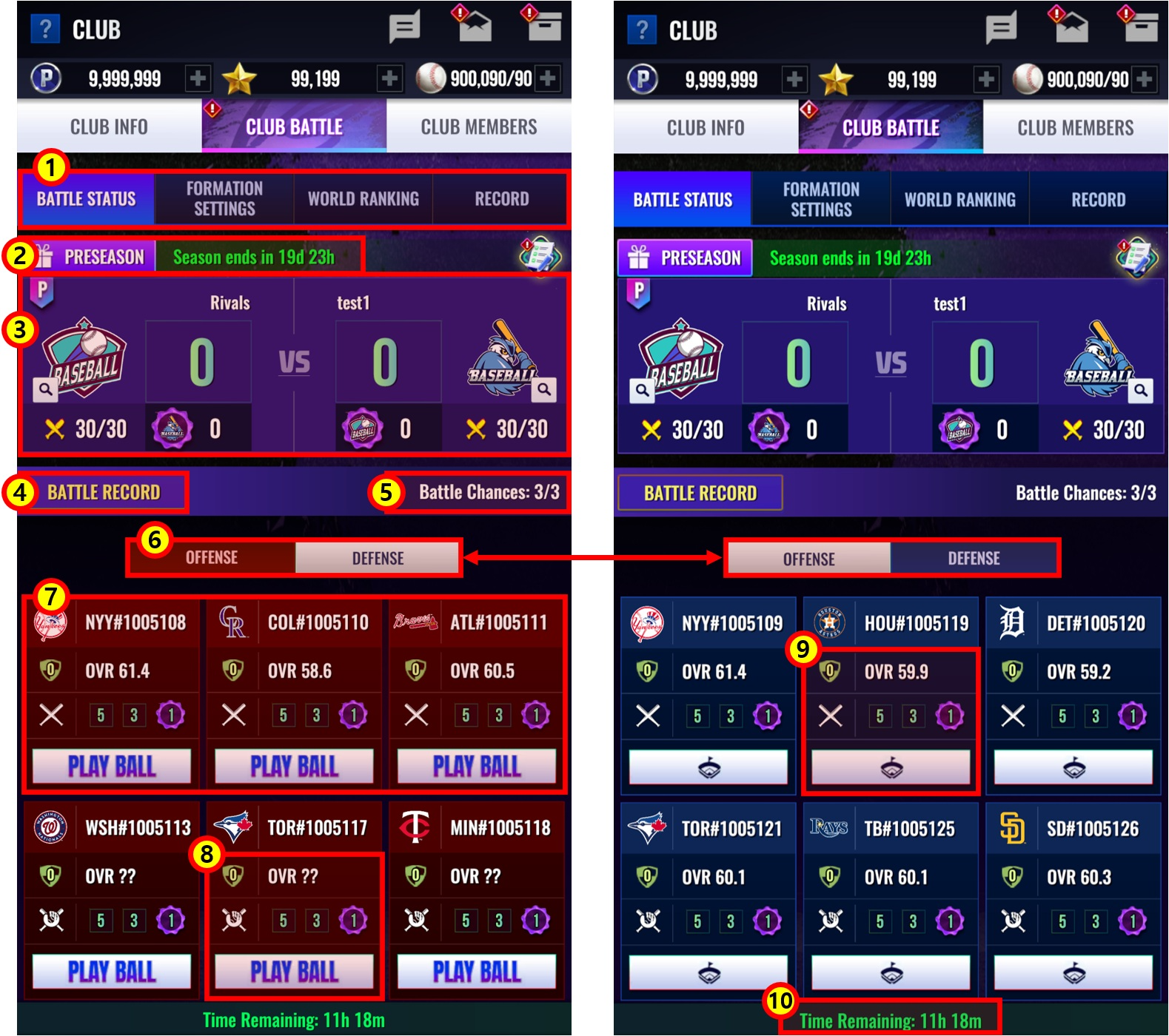
① Check the current Club Battle status, Formation Settings, World Rankings, and Records.
② View all available Club Battle rewards and the time remaining until the end of the current Club Battle season.
* The Preseason following the v3.06.00 update will last for 20 rounds.
③ Check the status of the ongoing Club Battle round.
④ Review Club Battle records.
⑤ View the number of remaining Attack attempts.
⑥ This tab displays your Club’s Defense status and the opposing Club’s Attack status.
⑦ This area displays the list of opposing Club members available to attack.
⑧ View the opponent’s OVR, Formation, and remaining Defense attempts.
* Club members in the Balance Formation will have their OVR hidden at the start of the round.
⑨ View your Club members’ OVR, Formation, and remaining Defense attempts.
⑩ Displays the time remaining until the end of the current Club Battle round.
A. Round Score
- Each Round is played in a 1v1 format, and the Club that earns the higher Round Score wins.
- Every Club member has 3 attack chances and 3 defense chances.
- Winning against an opposing Club member grants Round Score.
* You can attack the same opponent up to 3 times.
Type | Round Score |
First Win | +5 |
Second Win | +3 |
Third Win | +1 |
- If you lose an attack, the defending Club member receives an OVR -2 debuff (up to -20).
- Successfully defeating an opposing Club member three times will deduct all of that member’s defense chances and grant your Club a Club Emblem.
- Additional Round Score is awarded based on the number of Club Emblems obtained.
Club Emblems Obtained | Round Score |
1 | +5 |
3 | +10 |
5 | +15 |
7 | +20 |
9 | +25 |
11 | +30 |
13 | +35 |
15 | +40 |
17 | +45 |
19 | +50 |
20 | +55 |
- If the Round Score is tied at the end of the round, the winner will be determined based on the Victory Priority Rules.
Victory Priority | Rules |
1 | Club with the higher total Round Score |
2 | Club with more Emblems acquired |
3 | Club with more individual match wins |
3 | Club with more members |
3 | Club with an earlier founding date |
B. Club Points
- Winning a round will net you Club Points, while losing a round will deduct them.
- The amount of points gained or lost is determined by the Club Point difference between the two matched Clubs.
* Clubs with the lower CP will earn more points when winning, while Clubs with the higher CP will lose more points when defeated.
- At the end of a Round, additional Club Points are gained or lost based on the Round Score gap.
Type | Winning Club | Losing Club |
20-point gap | +10 | -10 |
30-point gap | +15 | -15 |
40-point gap | +20 | -20 |
- Rankings are determined based on Club Points at the time of the Round Settlement, and the total accumulated Club Points across all rounds will determine the final season ranking.
5. Club Member Formation Settings
- Formation Settings is a new strategic element in Club Battle.
- Formations are divided into Offense, Defense, and Balance, each applying different OVR buffs and debuffs:
> Offense Formation: OVR +2 buff when attacking, OVR -1 debuff when defending.
> Defense Formation: OVR +2 buff when defending, OVR -1 debuff when attacking.
> Balance Formation: No OVR buffs or debuffs.
- Formations can only be set by the Club Master or Vice Master, and may be changed from the Club Battle Rest period until 2 hours before the Round starts.
- Members in Offense and Defense Formations start with their OVR revealed, and both Formations must always have the same number of members assigned.
- Members in the Balance Formation start with their OVR hidden, but it will be revealed once they are attacked.
- New Club members who join during a Round will be eligible for Formation Settings starting from the Club Settlement completion after that Round ends.
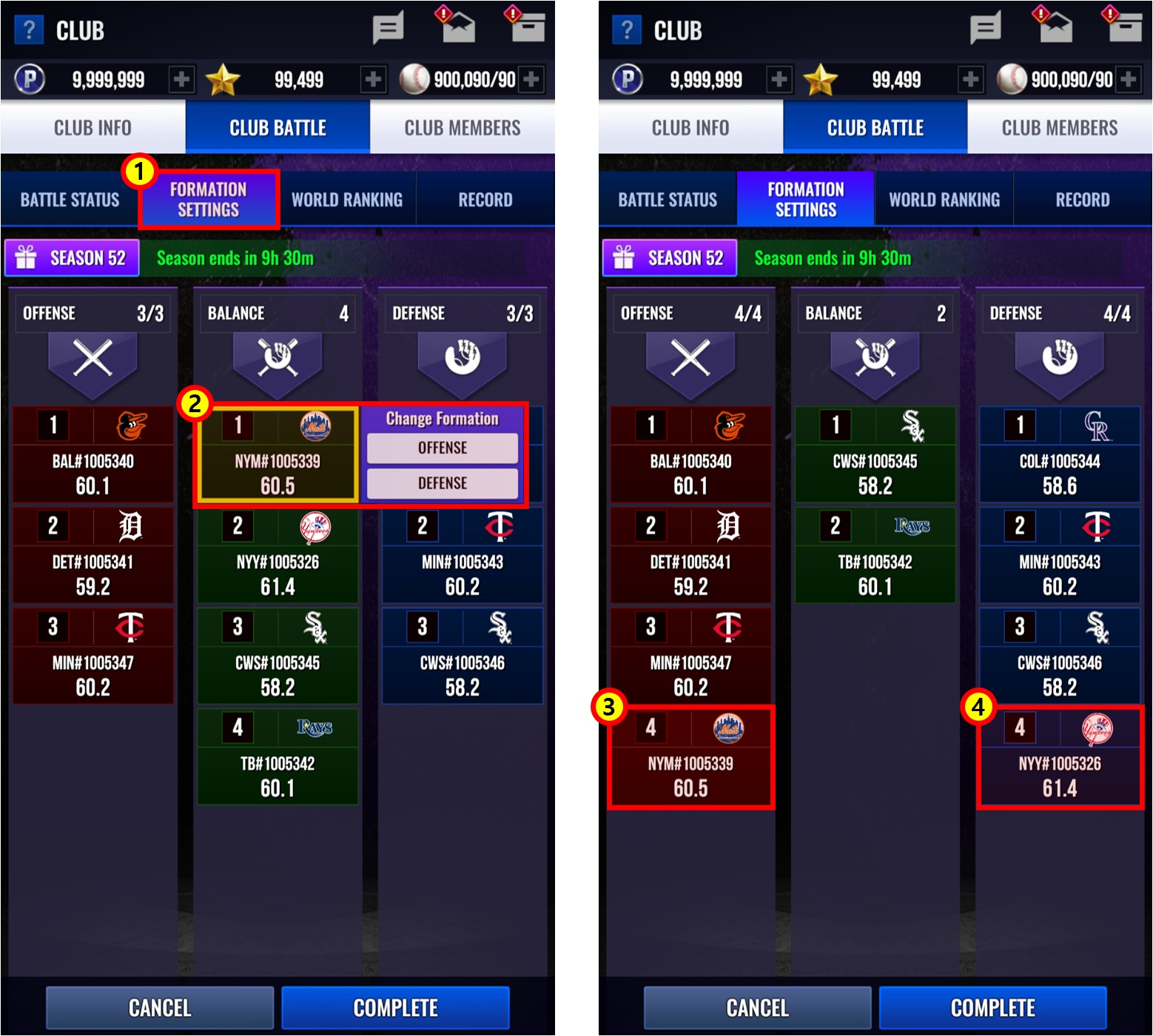
① Change Club member formations from the Formation Settings menu.
② Select and assign a Club member to one of the following: Attack, Defense, or Balance Formation.
③ A Club member assigned to the Attack Formation.
④ One member has been moved to the Defense Formation as the number of Attack and Defense members must be set equally.
6. Match Format
- Club Battles are played using your Club Battle Lineup.
- You can choose between two play modes: Quick Play or Pick Up Play.
A. Quick Play
- A simulation-based mode for fast and efficient gameplay.
B. Pickup Play
- Choose one part of your lineup—Table Setters, Cleanup, or Bottom of the Order—and a random batter from that part will be selected to play the match.
7. Rewards
- Tier Rewards
> Distributed at the end of the season based on your Club’s final Tier.
- Rank Rewards
> Distributed at the end of the season based on your Club's final ranking.
> You must be a member of the Club at the time of the final Round Settlement, and your Club must be included in the Club Battle list of the final Round.
> You must have at least one recorded attack during the season (excludes forfeits or default losses).
- Round Rewards
> Granted after each Round, based on your Club’s current Tier and the Round result (win/loss).
> You must be a member of the Club at the time of the Round Settlement, and you must have at least one recorded attack during that Round (excludes forfeits or default losses).
- Defense Rewards
> Additional rewards are granted based on the number of defenses during the Round.
> You must be a member of the Club at the time of the Round Settlement, and you must have at least one recorded defense during that Round.
- Game Rewards
> Granted after each match, based on your Club’s current Tier and the match result.
8. Precautions on Joining and Leaving Clubs
[Joining a Club]
- Users cannot join a Club during the Club Battle Round Matching period. (Applies to both instant and approval-based joining.)
- Users can join a Club during an ongoing Club Battle round, but newly joined members will not appear in menus such as Battle Status or Formation Settings during that round.
- New members will be visible in all Club Battle menus after the round ends and settlement is complete.
[Leaving a Club]
- Leaving a Club is unavailable during the Club Battle Round Matching period.
[Kicking Members]
- Members cannot be kicked from their Clubs during the Club Battle Round Matching period.
[Dismissing a Club]
- Clubs currently participating in a Club Battle Round can only be dismissed during the Rest period between rounds.
- Clubs not participating in a Round can only be dismissed outside the Matching period.
0/3000