[Notice] Server Transfer System Detailed Guide (Updated)

Greetings, Adventurers,
The server transfer period is scheduled to begin on March 6.
Please refer to the notice below to prepare for the transfer.
Server Transfer Period
✦ Period: 2026.03.06 14:00 ~ 2026.03.08 21:00 (UTC +8)
2026.03.06 14:00~ 2026.03.08 21:00 (UTC -3)
Server Transfer Conditions
✦ Server Transfer Groups
▹ Server transfers are only available between servers within the same region.
| SEA Region | SA Region |
| Marea | Rhai |
| Edoneh | Kael |
| Edwin | |
| Trian |
✦ Transfer Limit
During the transfer period, there is no limit on the number of transfers per account.
✦ Server Capacity Limit
If the maximum transfer capacity for a destination server is reached, transfer applications to that server will close and you will no longer be able to transfer there.
✦ Character Handling (Source / Destination Server)
When transferring servers, all characters on the source server will move to the destination server.
- All existing characters on the destination server will be deleted.
- Deleted characters cannot be restored.
If character slots were expanded on the source server, the expanded slot status will also be transferred to the destination server.
How to Proceed with Server Transfer
① Purchase a Server Transfer Ticket
From the source server you wish to transfer from, purchase a Server Transfer Ticket.
- Purchasing and holding the ticket on just one character will transfer all characters on that source server.
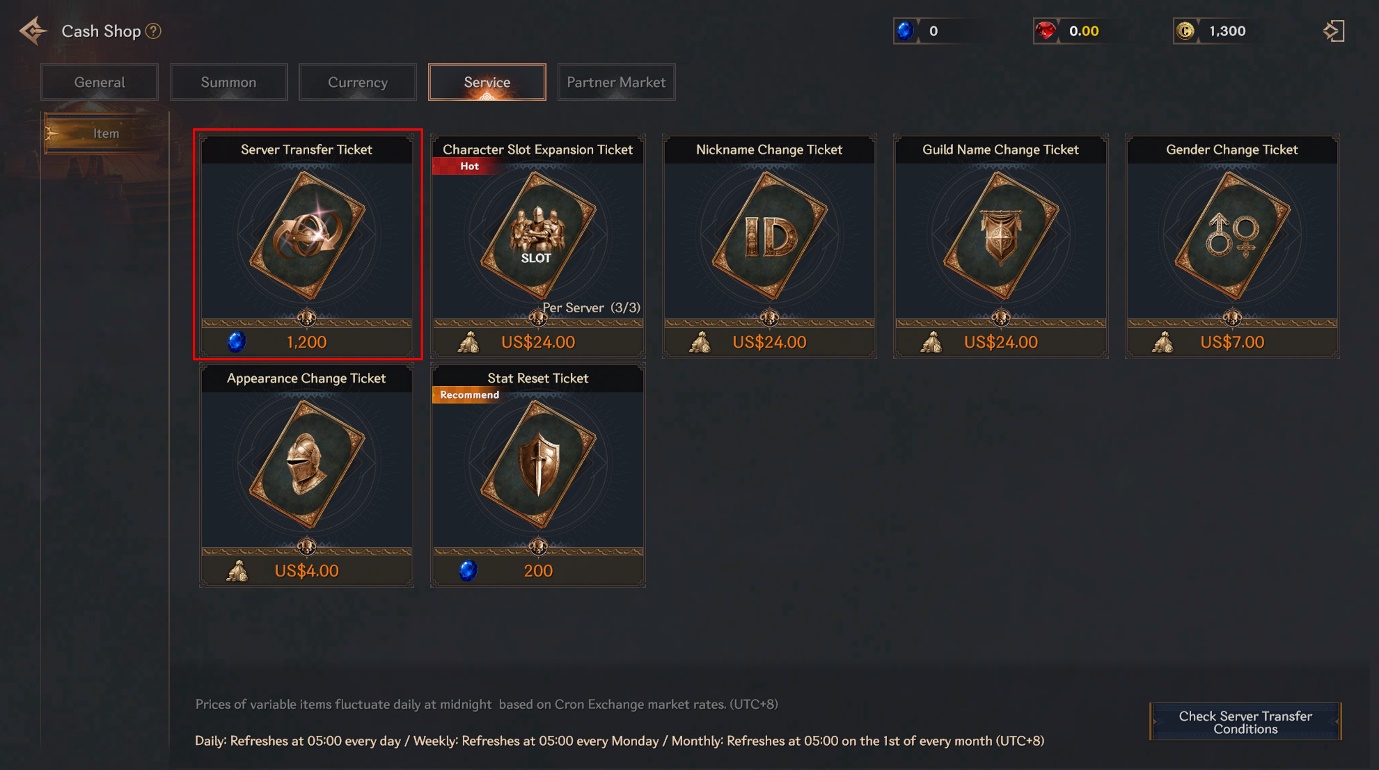
❈ Images shown in the notice are for reference only and may differ from the actual implementation.
▹ Server Transfer Ticket Details
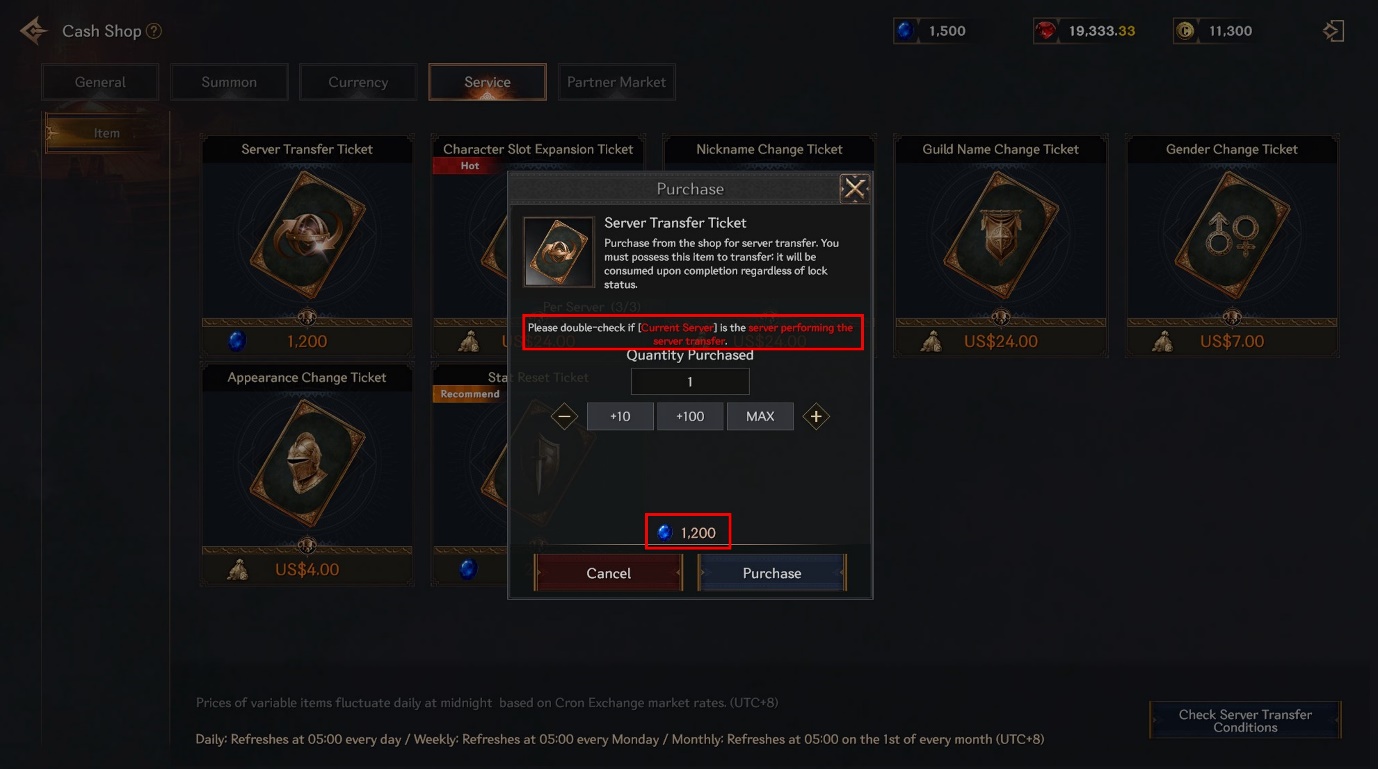
- - Available for purchase only during the Server Transfer Period
- - Eligible characters: Level 50 or above
- - Purchase location: Cash Shop → Service
- - Price: 1,200 Sapphire
- - Purchase limit: None
- - The ticket will be consumed upon transfer (regardless of lock status)
- - Unused tickets can be used in a future transfer period
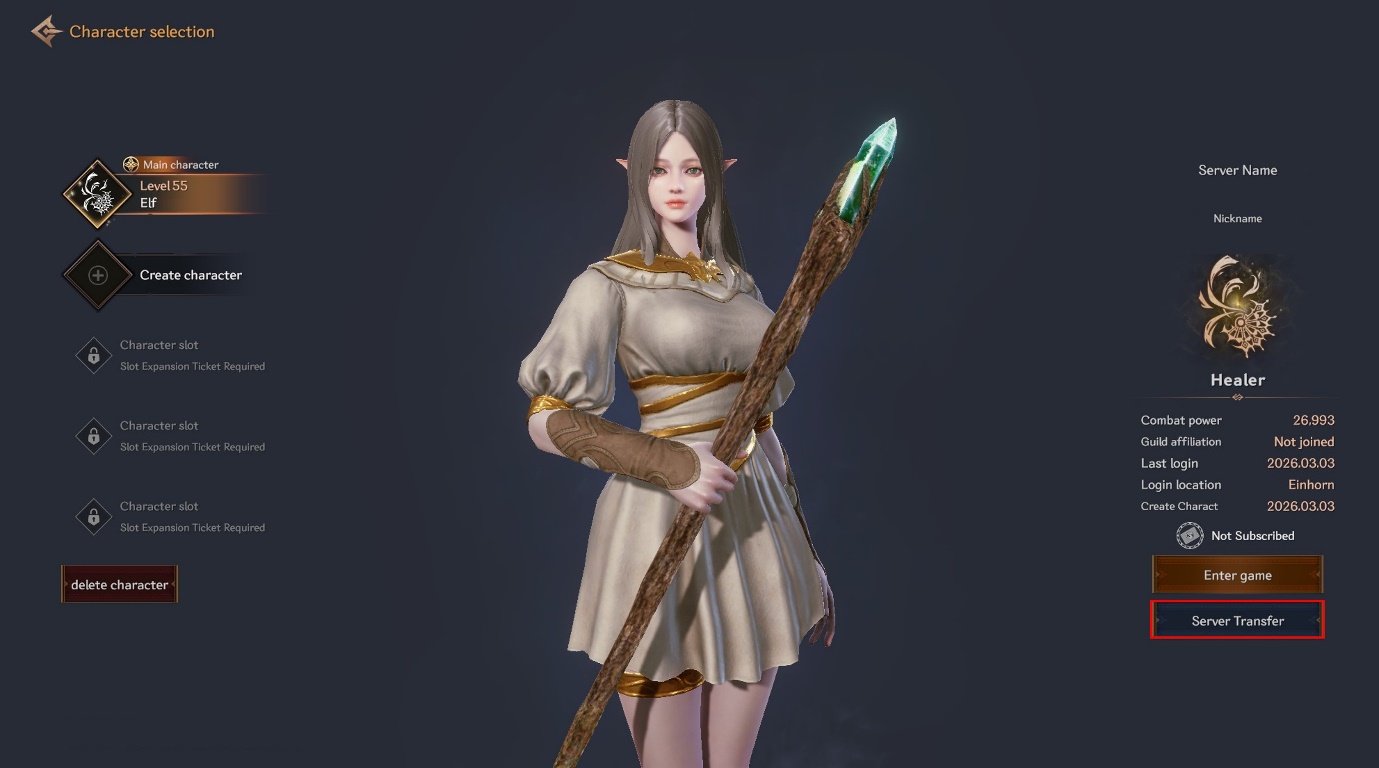
② Move All Characters to a Safe Zone
Move all characters on the source server to a Safe Zone, then click/tap the [Server Transfer] button from the Character Selection screen.
③ Select Destination Server
In the Server Transfer menu:
- Select the destination server
- Review transfer conditions (see detailed conditions below)
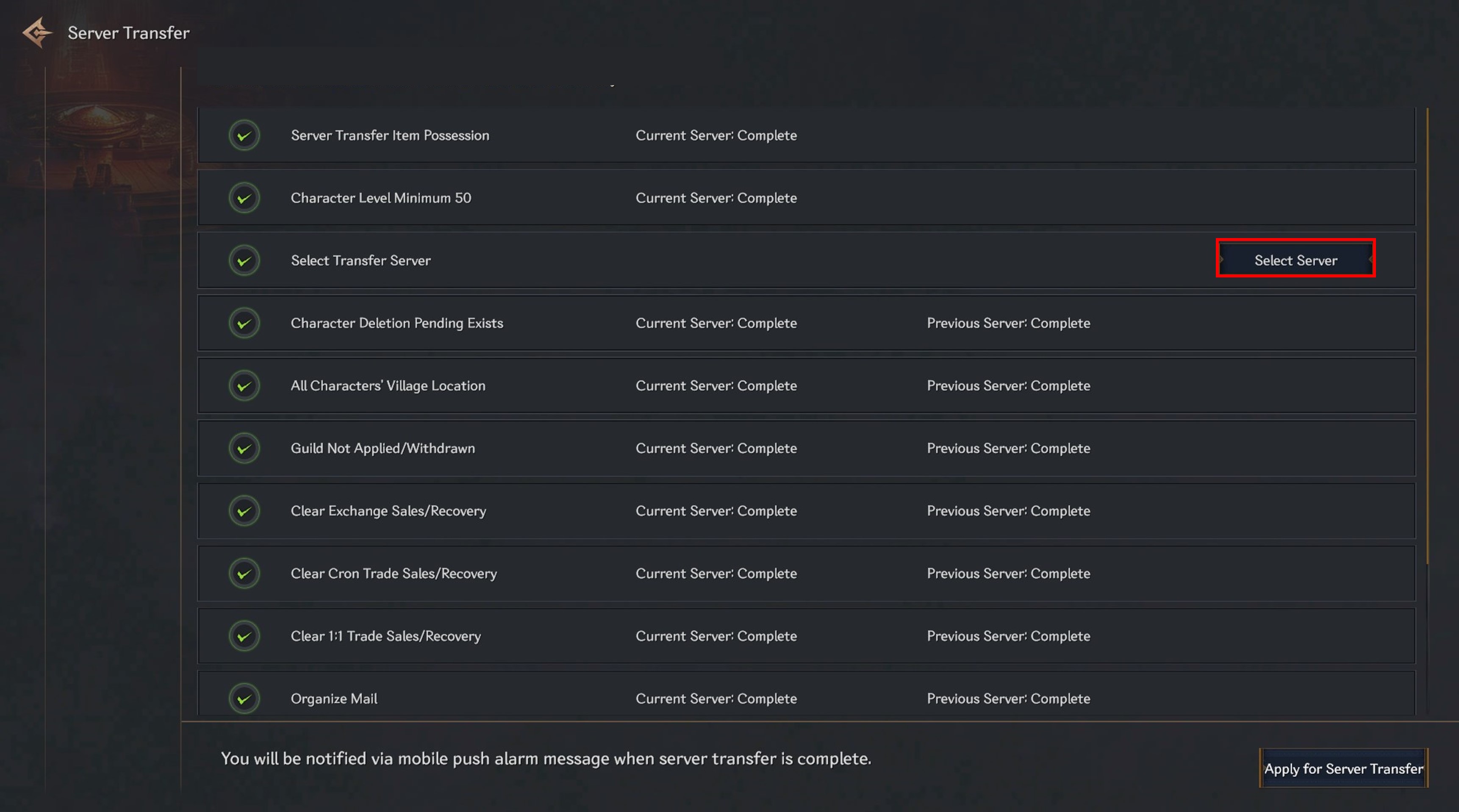
④ Submit Transfer Application
Once all conditions are met, Apply for Server Transfer button will activate.
- After submission, data transfer will begin.
- You will be moved to the destination server’s Character Selection Screen.
- A queue notice may appear depending on processing status.
- Game access will be restricted during the transfer process.
- Access will be restored once the transfer is complete.
⑤ Transfer Completion
- The transfer process takes approximately 10–30 minutes, depending on queue and network conditions.
- A push notification will be sent upon completion.
If push notifications are disabled or restricted by device settings, the notification will not be delivered.
You may enable push notifications via:
Settings → Notifications
Detailed Server Transfer Requirements
Clicking the [Server Transfer] button on the Character Selection Screen will display all required conditions.
All conditions must be satisfied to proceed.
✦ Requirements on the Source Server
- ▹ A Server Transfer Ticket must be in the character’s inventory.
- ▹ Character level must be 50 or higher.
- ▹ Destination server must be selected.
✦ Requirements on BOTH Source and Destination Servers
▹ Character
- - No characters pending deletion on the Character Selection screen.
- - All characters must be located in a Town Safe Zone.
- - All characters must:
- Not belong to a guild.
- Not have any pending guild join applications
▹ Market
- - No items listed or pending withdrawal in:
- Market
- Cron Exchange
- 1:1 Exchange
- - No unclaimed mail in any mailbox.
▹ Hunting Helper
- - “Automatically switch to Hunting Helper on game exit” must be set to OFF.
- - Hunting Helper inventory must be empty.
Data Handling During Server Transfer
✦ Data That Will Be Transferred
The following information from the source server will be maintained:
| Category | Details |
| Account | Nickname |
| Level | |
| Storage stored items | |
| Warehouse expansion history | |
| Saved location slots | |
| Bind Stone | |
| Character | Stat point allocation |
| Causality | |
| Currency | Ruby and Sapphire from both servers will be combined |
Cron from the source server will be retained. Cron on the destination server will be deleted. | |
Refined Serum (Blood Fog currency) from the source server will be retained. Refined Serum on the destination server will be deleted. | |
| Inventory | Equipped and owned items |
| Inventory expansion history | |
| Event | Event progress |
| Cash Shop | Subscription status / remaining duration |
| Purchase records for limited items | |
| Skill | Learn / Enhancement / Upgrade status |
| Equipped slots | |
| Quest | Main quest progress |
| Side quest progress | |
| Requests progress | |
| Achievement | Progress and completion status |
| Title | Active title |
| Collection effects | |
| Mount | Owned mounts |
| Codex | |
| Combine failure count | |
| Guaranteed Combine status | |
| Costume | Owned costumes |
| Owned costume cards | |
| Active effects | |
| Pet | Owned pets |
| Codex | |
| Combine failure count | |
| Guaranteed Combine status | |
| Hunting Helper | Hunting Helper settings |
| Dungeon | Normal Dungeon entry count |
| Personal Summon Dungeon entry count | |
| Monster Codex | Codex points |
| Codex Collection Effects | |
| Mission | Daily / Weekly / Monthly progress |
✦ Data That Will Be Reset After Transfer
| Category | Details |
| Mail history | |
| Market | Transaction history |
| Cron Exchange | Transaction history |
| 1:1 Exchange | Transaction history |
| Kill List | Combat records |
| PvP points | |
| Social | Friend list |
| Manage Friends | |
| Enemies settings | |
| Ranking | Level / Combat Power rankings |
| Guild Join Cooldown | The 24-hour guild join cooldown applied after leaving a guild will be reset. |
Important Notes
- ❊ Server transfers cannot be restored or canceled once completed.
- ❊ For a safe transfer, please apply at least 30 minutes before the transfer period ends.
- ❊ If a server/guild transfer does not process properly, please stop gameplay and contact Customer Support.
- ❊ Server transfers are individual transfers. Guild data does not transfer by default.
✦ Guild Transfer
The Guild Transfer feature allows guild information to transfer along with a server transfer.
▹ Extracting Guild Information
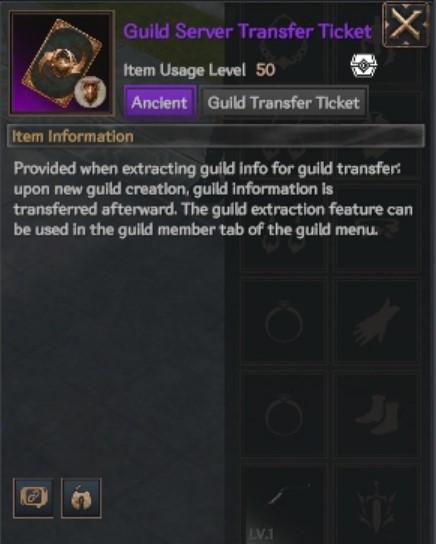
- - The Guild Master may extract guild information during the transfer period and obtain a Guild Server Transfer Ticket.
- - Extraction cost: Free
- - Upon completion:
- The Guild Transfer Ticket will be delivered to inventory.
- The guild will automatically be disbanded.
Conditions for Guild Information Extraction
- - Guild level must be 3 or higher
- - No guild members other than the Guild Master
- - Use Menu → Guild → Guild Member → Recommend Leave to request all members to leave at once.
- - No pending guild join applications
- - Guild Storage must be empty
▹ Transferring Guild Information
- - If you proceed with a server transfer while holding a Guild Transfer Ticket:
- A message will appear on the destination server asking whether to use the ticket.
- - If you create the guild through this message:
- The ticket will be consumed.
- The guild will be recreated with the extracted guild information applied.
▹ Data Handling During Guild Transfer
Information That Will Be Maintained
| Category | Details |
| Guild | Guild name |
| Guild level | |
| Guild currency | |
| Guild skill enhancement status | |
| Guild storage expansion status |
Information That Will Be Reset
| Category | Details |
| Guild | Guild history |
| Guild relations | |
| Cumulative Guild Points (including Guild Master)) | |
| Guild territory ownership |
Thank you.
— R.O.H.A.N.2 Global Team
**Note: The English version is the most accurate. Announcements and guides in other languages are provided for reference only.