[EVENT] Hall of Fame Player Card Acquisition Event Notice
Greetings from Com2uS!
[Beyond Legendary – Hall of Fame]
The legends from MLB’s glorious history return to the field!
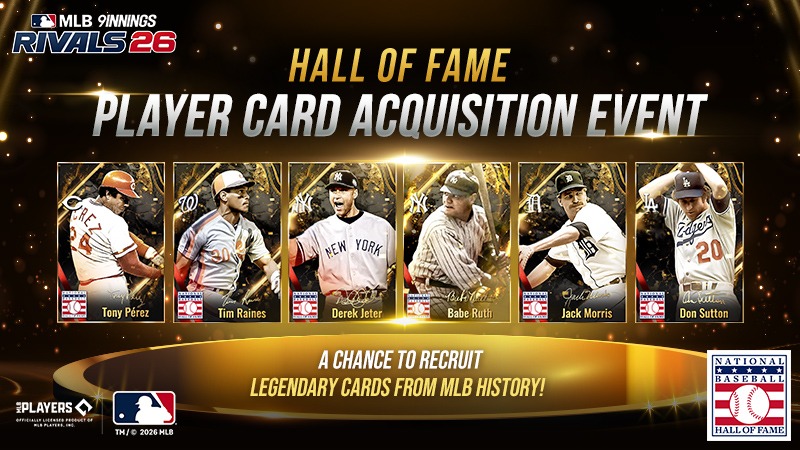
To celebrate the launch of Hall of Fame Cards in MLB 9 Innings Rivals, we're holding a special event where you can immediately obtain one of six Hall of Fame Cards—featuring none other than [Babe Ruth].
Build your very own Hall of Fame lineup with these iconic players who’ve defined the greatest moments in baseball history.
Please read below for more details.
■ What is a Hall of Fame Card?
- Hall of Fame Cards feature players inducted into the MLB Hall of Fame and grant Deck Score benefits regardless of their teams.
■ Event Period
- After the v.4.00.00 Update - Until further notice
■ Eligibility
- Available once per account to all MLB 9 INNINGS RIVALS users
* If you have already participated in the previous Hall of Fame Card Release Event, you will not be able to participate in this event. However, you can exchange for 1 card out of 6 through the HOF Card Exchange.
(Please refer to the bottom of the notice for the exchange method.)
■ Event Details
- You can select and acquire 1 out of 6 designated Hall of Fame cards during the event.
- Select the HOF icon on the right side of the main screen to access the event page.
- You can choose between featured players like Derek Jeter and Babe Ruth, or other selectable Hall of Famers.
* Once a player is selected and claimed, the event will automatically end. Please choose carefully—changes cannot be made afterward.
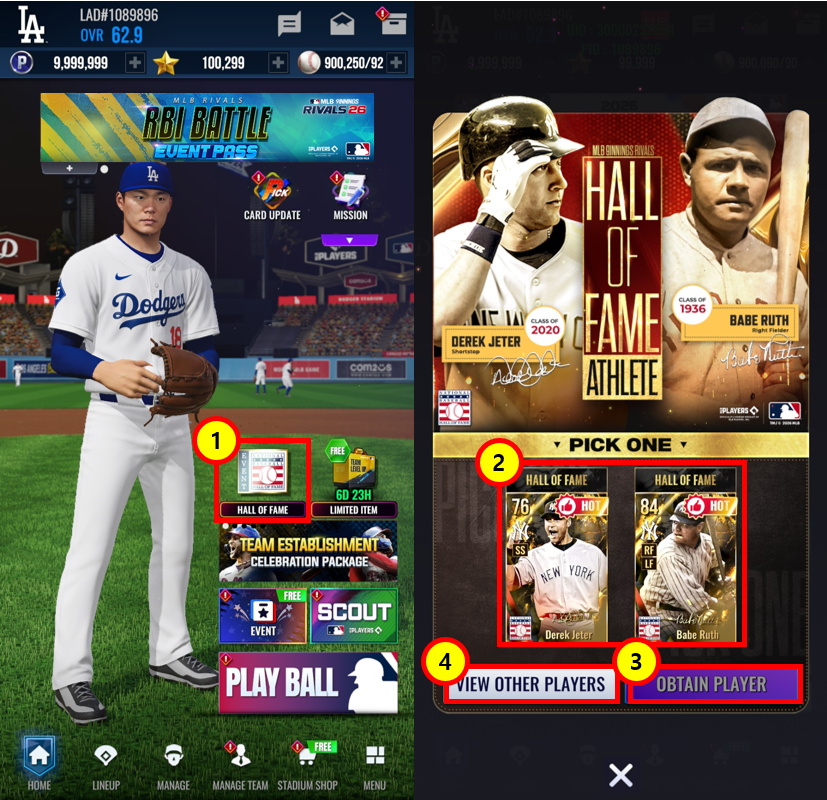
① Select the HOF icon on the main screen to access the event page.
② View the featured HOF Players.
③ Instantly claim your selected HOF Card.
④ Select the button to view the full list of available players.
▼ Available Player List
Team | Name | Position | Alt Team | Position |
NYY | Babe Ruth | LR, RF | BOS | SP, LF |
NYY | Derek Jeter | SS | - | SS |
CIN | Tony Pérez | 1B, 3B | WSH | 1B |
BOS | ||||
WSH | Tim Raines | LF | CWS | LF |
DET | Jack Morris | SP | MIN | SP |
TOR | ||||
LAD | Don Sutton | SP | HOU | SP |
MIL | ||||
LAA |
- The default team affiliation will be the team listed in the first column of the table. You can change this to an Alt Team after acquisition. For more details, please refer to the linked guide.
■ Please Note
- Rewards cannot be claimed after the event ends. Please make sure to claim your reward during the event period.
- The information in this notice (including screenshots and values) is based on a version still in development, and may differ from the final in-game content.
■ How to Access the Event
- Main Screen > Event icon on the right side > Event Page
■ HOF Card Exchange Guide
- Available to exchange certain HOF cards for other HOF cards.
- You can change a HOF Card you currently own to another HOF Card. (However, the card you wish to change must be unequipped from all lineups and events before use.)
- Exchange is available only once per account.
- Cards used as material cards will be consumed, so please choose carefully.
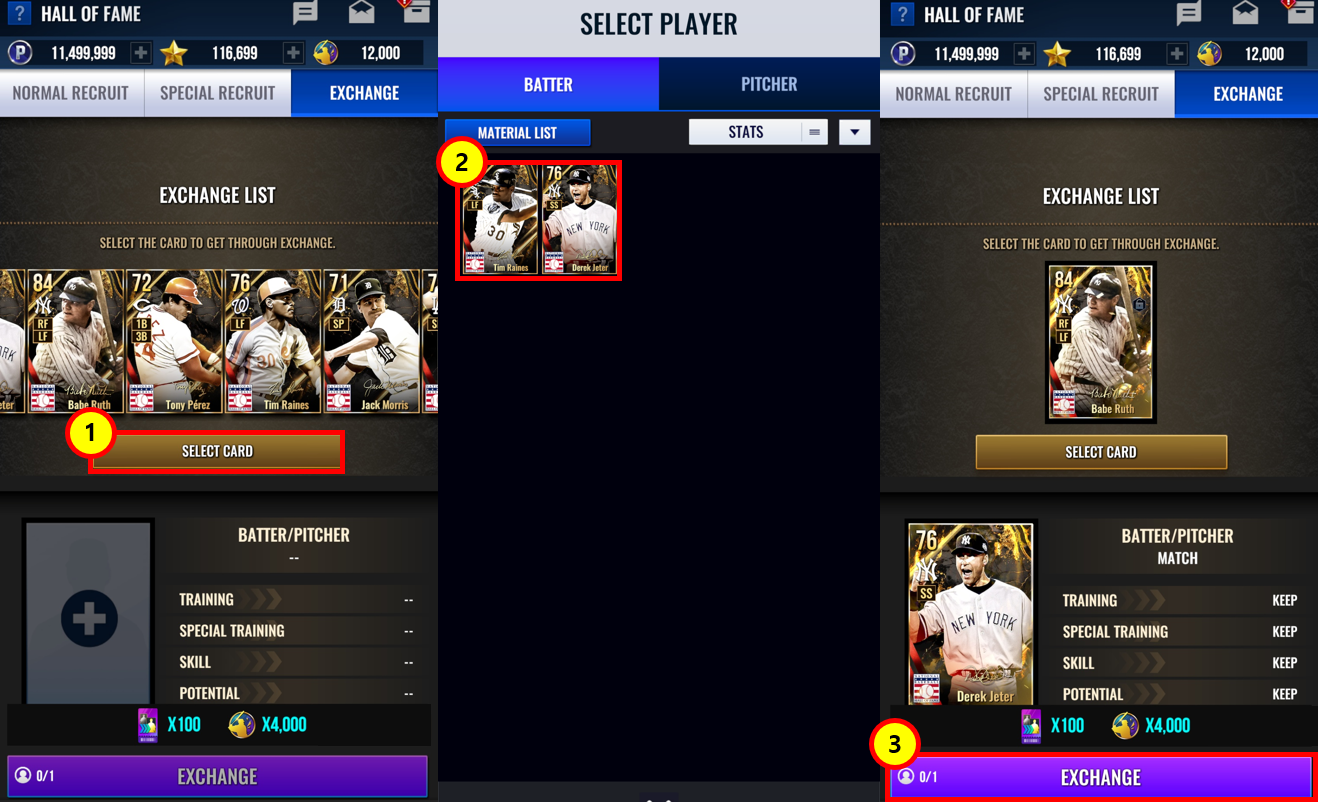
① Select the card you wish to obtain through exchange.
② Select the card to be used as the material card. (Only cards that can be used as material cards will be displayed.)
③ Exchange the selected cards.
▼ Exchange Rules
[Result Card] Batter | [Result Card] Pitcher | [Result Card] 2-Way (Batter) | [Result Card] 2-Way Pitcher | |
[Material Card] Batter | Match | Mismatch | Match (Pitcher applies base stats) | Mismatch (Batter applies base stats) |
[Material Card] Pitcher | Mismatch | Match | Mismatch (Pitcher applies base stats) | Match (Batter applies base stats) |
[Material Card] 2-Way (Batter) | Match | Mismatch | Match (Includes pitcher stat transfer) | Match (Includes batter stat transfer) |
[Material Card] 2-Way (Pitcher) | Mismatch | Match | Match (Includes pitcher stat transfer) | Match (Includes batter stat transfer) |
▼ Stat Transfer
Match | Mismatch | |
Upgrade | Applies Material Card Upgrade Lv. | Same as Match |
Limit Break | Transfers Material Card Limit Break Lv. and EXP | Same as Match |
Training | Transfers Material Card Training Lv. (including reallocated stats) | Transfers Material Card Training Lv. (Training stats reallocated according to Lv.) |
Training Boost | Transfers Material Card Training Boost Lv. | Same as Match |
Special Training | Transfers Material Card Special Training Lv., EXP, growth stats, and random stat increase values | Transfers Material Card Special Training Lv. and EXP Reselect Special Training Stats / Randomly Reallocates Randomly Increased Values |
Potential | Transfers Material Card Unlocked Bonus Potential Count Retains Potentials Expanded Through Transcendence and Transcendence Potentials Select New Transcendence Potential for Duplicates Resets Potential Growth Values | Transfers Material Card Unlocked Bonus Potential Count (randomly redistributed to all Potentials except Transcendence Potentials) Retains slot positions and count of Potentials expanded through Transcendence Retains the unlocked and expanded slot count of Transcendence Potentials Resets Potential Growth Values |
Skill | Transfers Material Card Skills Identically Transfers Position-Mismatched Skills While Keeping Them Unchanged | Obtains Random Skills of the Same Tier as the Material Card |
Transcendence | Applies Material Card Transcendence Lv. and EXP | Same as Match |
■ How to Access the HOF Exchange Menu
- Main Screen > Manage Team > Hall of Fame > Exchange Page
Thank you.
0/3000