MLB RIVALS Web Shop Now Open

Greetings from Com2uS!
To provide users with a more convenient purchasing experience, the MLB RIVALS Web Shop has officially opened! 🎉
In the Web Shop, you can purchase H Cash, which is used to buy paid items in the game.
With H Cash, you can enjoy a simpler and more convenient way to purchase a variety of in-game offers.

▶ What is H Cash?
- [H Cash] is a new currency in MLB RIVALS that allows you to purchase offers in the in-game shop more conveniently.
▶ In-Game Product H Cash Price List
- The H Cash prices for each in-game product are as follows.
Product Price | H Cash Price |
$0.99 | H Cash x100 |
$1.99 | H Cash x270 |
$2.99 | H Cash x380 |
$4.99 | H Cash x650 |
$9.99 | H Cash x1,400 |
$24.99 | H Cash x3,300 |
$41.99 | H Cash x5,500 |
$49.99 | H Cash x6,600 |
$79.99 | H Cash x11,000 |
$99.99 | H Cash x14,900 |
▶ How do I use H Cash?
- When you own [H Cash], a [Purchase with H Cash] ON/OFF toggle will appear at the bottom of the in-game shop.
When turned ON, your available H Cash balance will be displayed, and prices in the shop will be shown in H Cash.
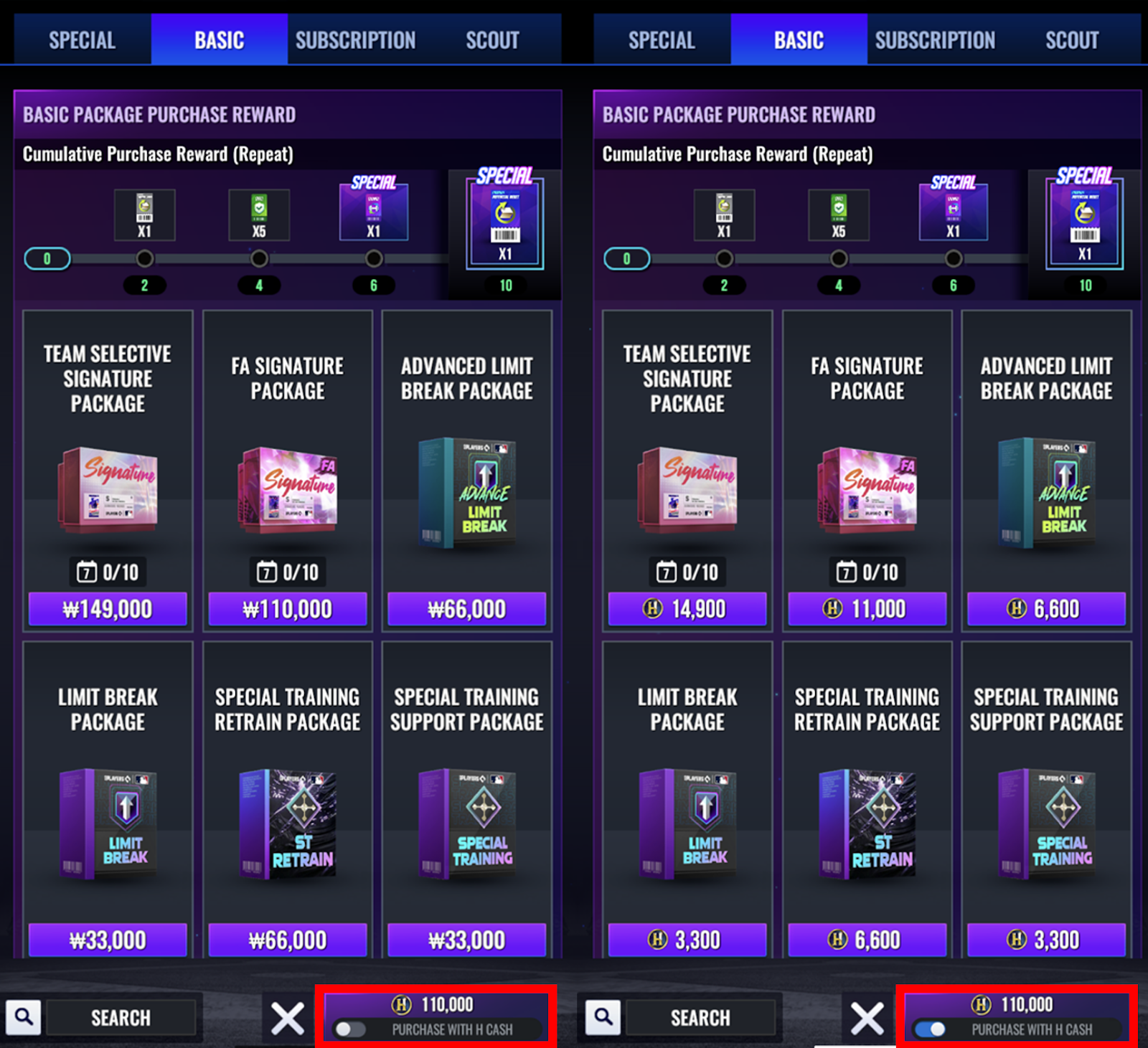
- By purchasing Web Shop offers, you can earn up to 10% bonus H Cash.
* Please Note
- You must log in with your game account to purchase items from the Web Shop.
- Only accounts with an in-app purchase record can purchase products in the Web Shop. (Modified on 3/4, 4:55 AM EST)
- Please note that the Web Shop may be unavailable during certain periods due to updates or maintenance.
- Purchased items will be sent to the Inbox of the selected account.
- All in-game item purchases are subject to the Terms of Service.
- When using H Cash, Bonus H Cash will be consumed first.
- Refunds are not available once purchased H Cash (including Bonus H Cash) has been used.
- Payment limits by payment method can be checked on a separate page.
- You will be entitled to a limited license upon purchase. Learn more.
We kindly ask for your interest and support for the MLB RIVALS Web Shop.
To celebrate the Web Shop opening, special events are also underway. Don't miss out!
1. Web Shop Opening Discount Event
▶ Event Period
- Mar. 4, 12:00 AM EST - Until further notice
▶ Event Details
- To celebrate the Web Shop opening, a discounted offer that can be purchased once per account will be available during the event period.
- "H Cash 100 + Star 3,000" will be available in the Web Shop during the event period.
2. Web Shop Opening Coupon Event
▶ Event Period
- Mar. 4, 12:00 AM EST - Mar. 31, 10:59 AM EDT
▶ Event Details
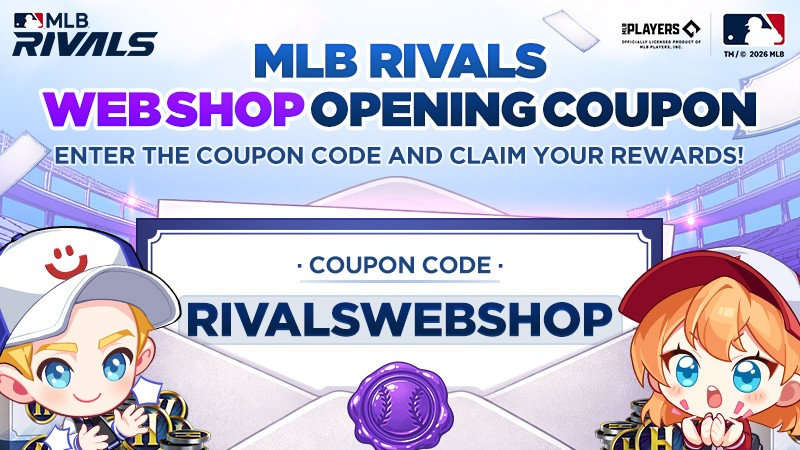
- Enter the coupon code below in the in-game Coupon Exchange or select the coupon link to claim your reward.
Coupon Code | Rewards | Period |
Ball x300 Quick Play Ticket x30 Star x300 | Mar. 4, 12:00 AM EST - Mar. 31, 10:59 AM EDT |
- The coupon can be used once per account during the period.
- Items will be sent to the Inbox of the account where the coupon was claimed.
- Select the coupon link to get the coupon reward.
※ Please access through an external web browser and claim the coupon code.
- How to Claim the Coupon
You can claim the coupon code to obtain items through the three methods below.
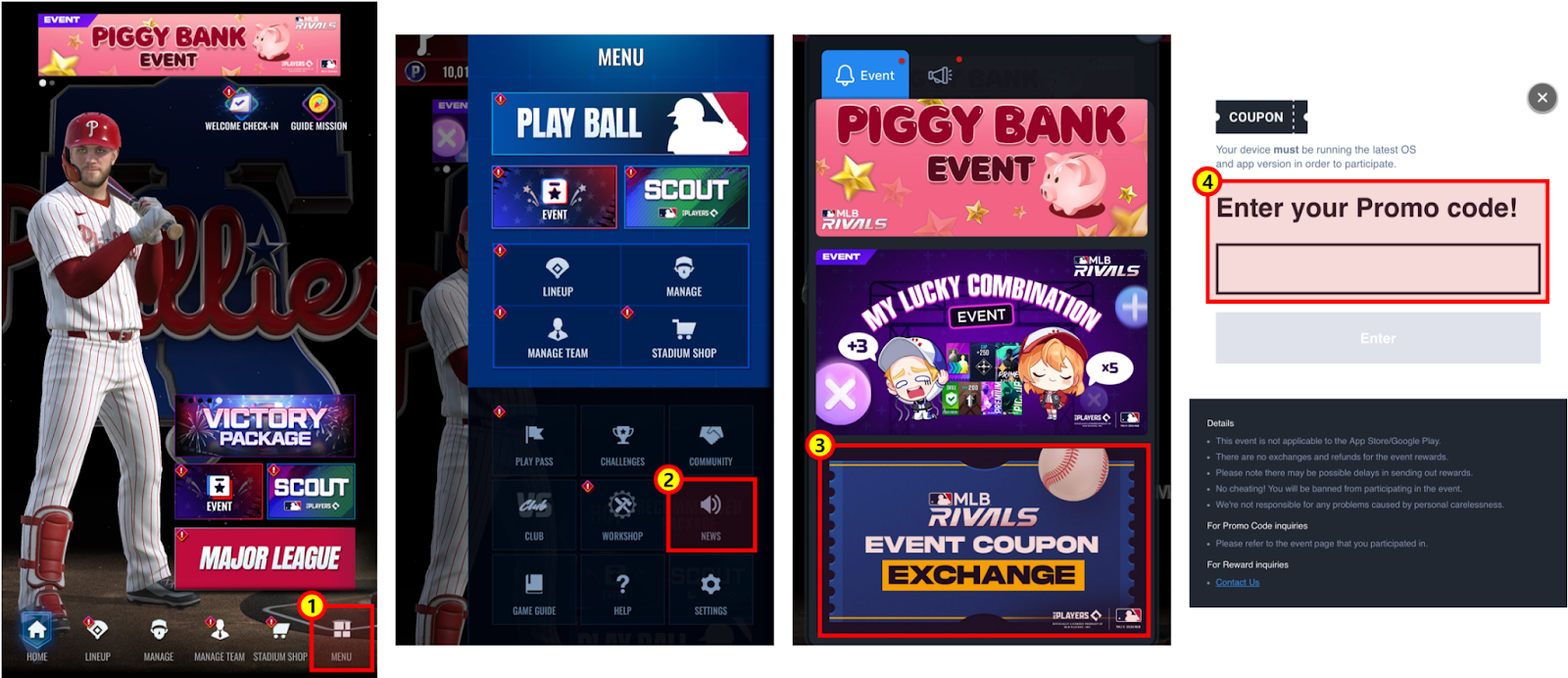
1. Go to the Main Menu > News > Event Coupon Exchange and enter the coupon code.
- This method is only available for Android devices.
2. After logging in to the official forum, enter the coupon code through the coupon exchange menu.
- For iOS devices, the coupon exchange menu will not appear when you access the official forum through the community menu shown on the main screen. Please log in through an external web browser and claim the coupon code.
- Log in with the account you created your team with to check the coupon exchange menu.
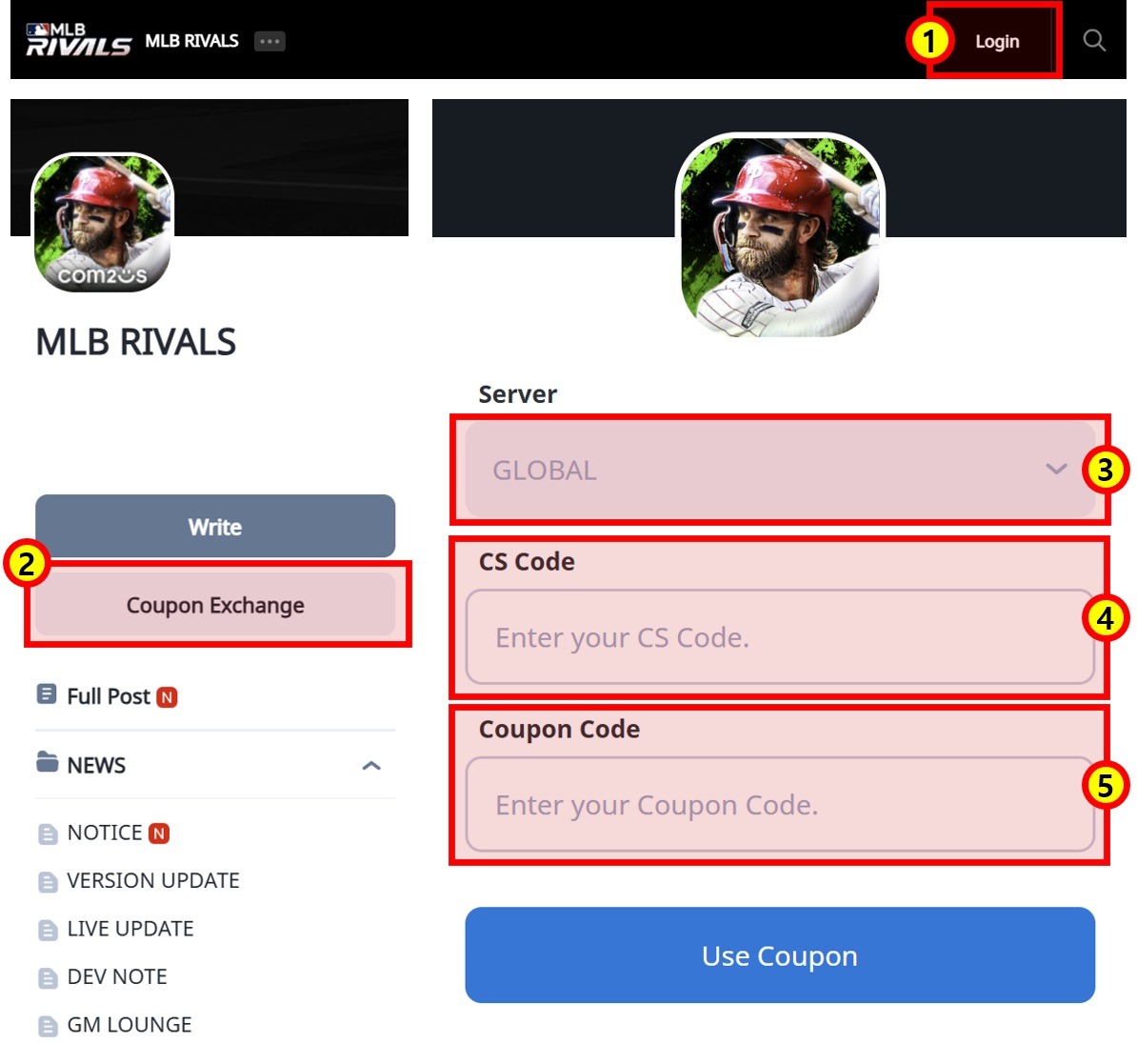
① Log in to the official forum
② Tap on the coupon exchange banner
③ Server: GLOBAL
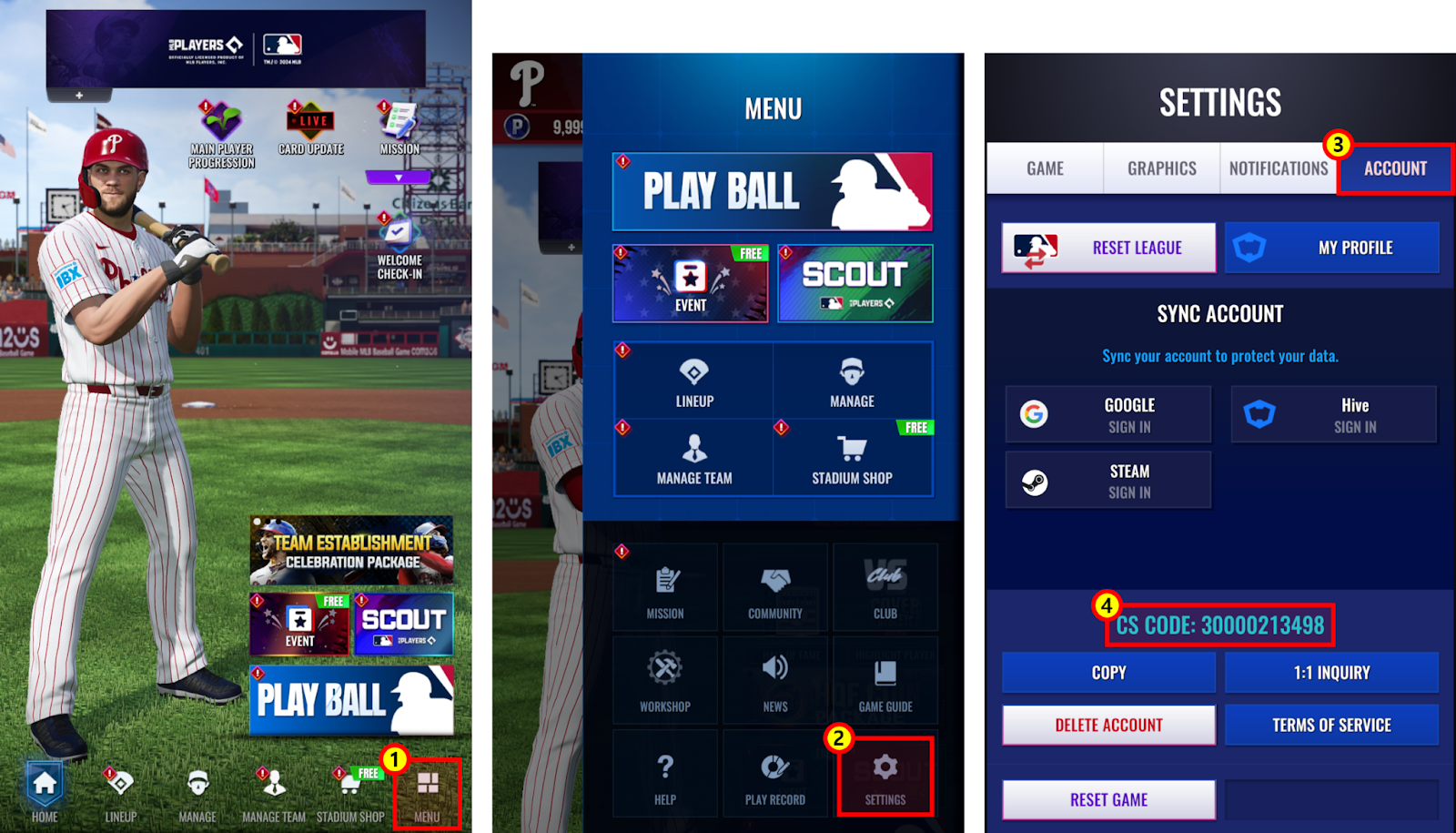
④ Enter the CS CODE of the account you would like to receive the items with
⑤ Enter coupon code.
3. You can claim coupon rewards when you access the link below.
- Please access through an external web browser and claim the coupon code.
4. Coupon exchange URL
- Enter your CS CODE and coupon code in the coupon exchange link below to claim the coupon reward.
[Go to Coupon Exchange]
- How to Check Your CS code
- CS CODE in Menu > Settings > Account tab
Thank you.