[Event] Player Upgrade Event Notice (HOF) (Updated on Apr. 22, 5:30 AM EDT)
Greetings from Com2uS!
The [Player Upgrade Event] is here! Upgrade your desired [HOF player] with a guaranteed 100% success rate!
This time, the event offers a base 5% Critical Rate, which can be boosted to 25% by using an [(Event) Critical 20% Token].
Take your team to the next level by upgrading your players!
■ Event Period
- Apr. 13, 1:00 AM - Apr. 27, 12:59 AM [EDT]
■ Event Details
# Complete missions and get Upgrade Support Tokens!
- Earn up to 6,000 Upgrade Support Tokens per week by completing Daily Missions.
- Upgrade Support Tokens can be used to upgrade player cards or purchase items in the event shop.
▼ Upgrade Event Missions
Type | Mission | Reward | Qty |
Account | [League Mode] Finish a Game 300 times | (EVENT) CRITICAL 20% TOKEN | 1 |
Daily | [Ranked Slugger] Finish a Game 3 times | UPGRADE SUPPORT TOKEN | 400 |
[Ranked Battle] Finish a Game 20 times | UPGRADE SUPPORT TOKEN | 400 | |
Repeat | [RBI Battle] Finish a Game 1 time | UPGRADE SUPPORT TOKEN | 100 |
[Live Match] Score a Run 1 time | UPGRADE SUPPORT TOKEN | 200 |
# Upgrade a player of your choice with a 100% success chance!
- By spending Upgrade Support Tokens, you can increase a player’s Upgrade Level with a 100% success rate.
- A base 5% Critical Rate applies when attempting an Upgrade, and using an (Event) Critical 20% Token increases the Critical Rate up to 25% total.
- The number of Upgrade Support Tokens required varies depending on the card rarity and current upgrade level.
- The maximum upgrade level available through the event differs based on card rarity.
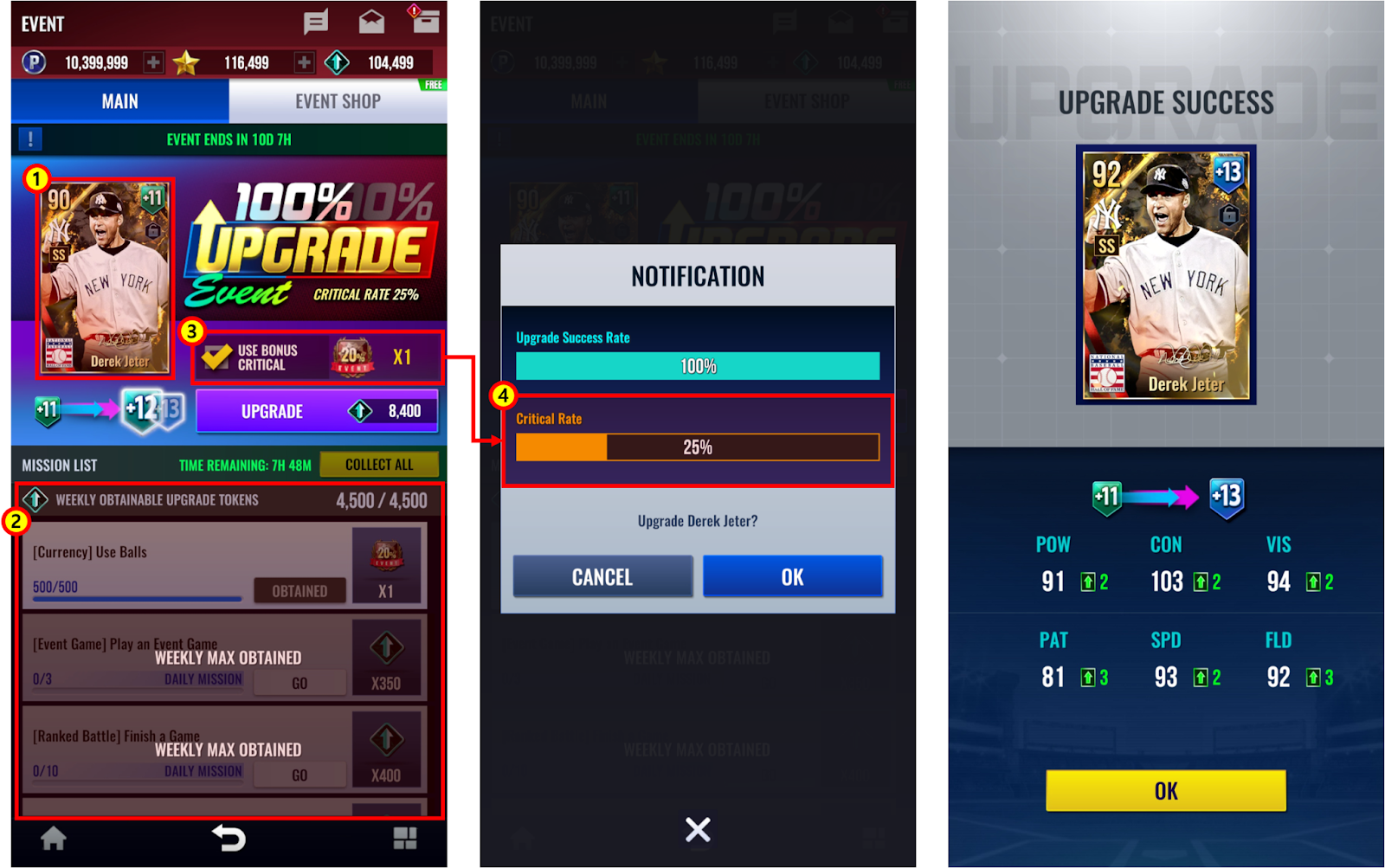
① Add a player card to proceed with the Upgrade.
② Earn Upgrade Support Tokens by completing Account, Daily, and Repeat Missions.
③ Use an (Event) Critical 20% Token to increase the Critical Rate up to 25% total.
④ Check the increased Critical Rate.
▼ Maximum Upgrade Level by Card Rarity
- The maximum Upgrade level you can attempt depends on the card rarity.
- To succeed with a Critical Upgrade, there must be at least 2 available Upgrade levels remaining.
* Example:
> +11 HOF Card (Limit Break Lv. 2) → Upgradeable up to +14 → 3 spare levels (Critical Upgrade available)
> +11 HOF Card (Limit Break Lv. 1) → Upgradeable up to +12 → 1 spare level (Critical Upgrade NOT available)
* If Critical Upgrade is not available, the Critical effect will not occur during the Upgrade.
(Updated on Apr. 22, 5:30 AM EDT)
Rarity | Max Upgrade Attempt Level | Critical Success |
HOF | Lv. 12 | Lv. 14 |
▼ Tokens Required per Card Rarity
Rarity | Upgrade Level | Tokens |
HOF | 1 | 200 |
2 | 300 | |
3 | 500 | |
4 | 550 | |
5 | 600 | |
6 | 650 | |
7 | 700 | |
8 | 800 | |
9 | 900 | |
10 | 1,000 | |
11 | 1,500 | |
12 | 2,500 | |
13 | 4,500 |
# Purchase various items in the event shop!
- You can purchase items with Upgrade Support Tokens in the event shop.
- An Upgrade Event Package will also be available in the Event Shop.
▼ Event Shop
Item | Price | Purchase Limit |
Upgrade Event Package | In-app Purchase | 1 time per account |
HOF TRAINING BOOST TICKETx5 | Free | Once per day |
200 LIMIT BREAK CARD | 10,000,000 POINT | 1 time per account |
1,000 LIMIT BREAK CARD | 12,000 STAR | 1 time per account |
UPGRADE CRITICAL BADGE | 2,000 UPGRADE SUPPORT TOKENS | 2 times per account |
UPGRADE SUCCESS BADGE | 1,500 UPGRADE SUPPORT TOKENS | 2 times per account |
OVR 80 UPGRADE CARD | 50 UPGRADE SUPPORT TOKENS | 80 times per account |
QUICK PLAY TICKET | 30 UPGRADE SUPPORT TOKENS | 50 times per account |
OVR 70 UPGRADE CARD | 20 UPGRADE SUPPORT TOKENS | 100 times per account |
50,000 POINTS | 50 UPGRADE SUPPORT TOKENS | Unlimited |
▼ Upgrade Event Package Details
Components | Quantity | Available Purchases |
UPGRADE SUPPORT TOKEN | 7,000 | 1 time per account |
(EVENT) CRITICAL 20% TOKEN | 1 | |
OVR 90 UPGRADE CARD | 1,000 | |
STAR | 3,000 | |
POINT | 3,000,000 | |
M POINT | 690 |
■ Please Note
- Unused Upgrade Support Tokens will disappear after the event shop closes.
* Upgrade Support Tokens that are not claimed after completing the missions cannot be obtained upon mission reset.
■ How to Access the Event Page
- Main menu > Banner on top of the screen > Event banner
Thank you.
0/3000