[Event] Preferred Team Player Acquisition Event (Updated on Jan. 28, 5:45 AM EST)
Greetings from Com2uS!
Please read below for details on the [Preferred Team Player Acquisition Event], which lets you draft key players from preferred teams and obtain various items.
■ Event Period
- Dec. 16, 10:00 PM - Feb. 18, 2026 11:59 PM EST
※ Event rewards can be claimed by Feb. 19, 2026 11:59 PM EST
■ Event Eligibility
- Once per account for [all MLB RIVALS users]
■ Event Details
- The event consists of 3 STEPs, which will open sequentially.
- You can earn rewards based on the total number of Event Points accumulated during each STEP.
- Once you reach the required number of Event Points for a STEP, you’ll be able to recruit a player of the following rarity:
> STEP 1: Impact
> STEP 2: Prime
> STEP 3: Signature
* Accumulate 1,000/1,000/7,500 Event Points in each STEP to recruit one of the available players.
- You can change your selected player up to 2 times for free. Afterward, changes will require a certain amount of currency.
> STEP 1: 300,000 Points
> STEP 2: 300 Stars
> STEP 3: 500 Stars
※ You can change the player without limit. Please note that a random player, including the current player, will be selected when you change.
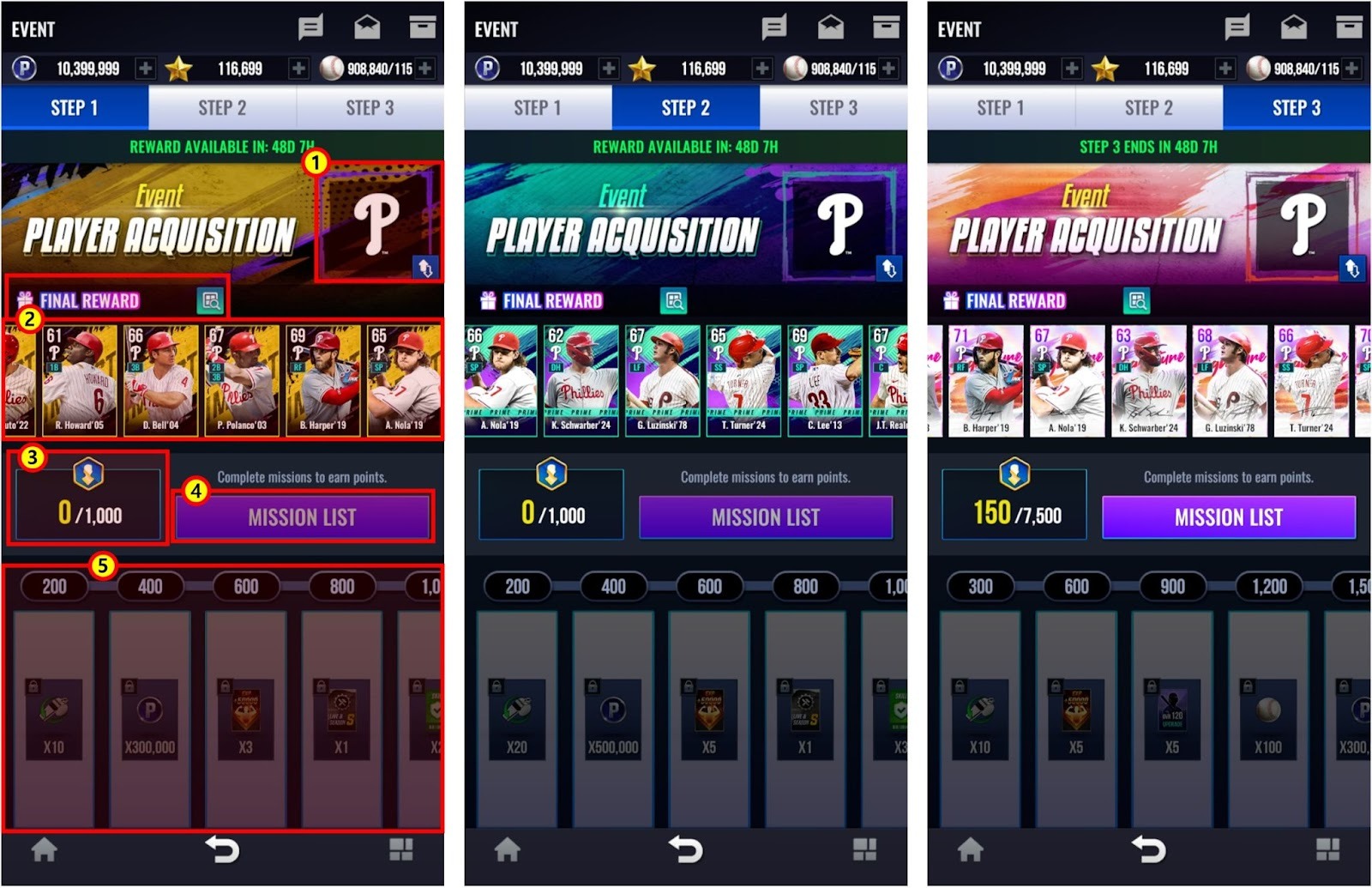
① A team is selected for each STEP.
② You can check all of the cards that you can obtain per STEP.
③ You can check the total amount of event points earned and the maximum amount of event points you can obtain per STEP.
④ You can check the list of missions and their progress.
⑤ You can check the total amount of event points earned and claim rewards.
※ The game screens above are currently under development and may differ from the actual game screen.
▼ Event Schedule
- Event Points can only be accumulated during each STEP period.
- After STEP 3 ends, there will be a 1-day reward collection period.
* The remaining time is based on midnight of your server time.
* During the reward collection period, you can claim rewards and players from STEPs 1,2,3 but you will no longer be able to earn Event Points.
STEP | Remaining Play Time | Player Grade |
1 | Dec. 16, 10:00 PM - Dec. 23, 11:59 PM EST | Impact |
2 | Dec. 24, 12:00 AM - Dec. 30, 11:59 PM EST | Prime |
3 | Dec. 31, 12:00 AM - Feb. 18, 2026 11:59 PM EST | Signature |
Reward Collection Period | - Feb. 19, 2026 11:59 PM EST | - |
▼ Event Mission (Updated on Jan. 28, 5:45 AM EST)
- Event missions reset at midnight of your server time.
STEP | Type | Mission | Reward | Quantity |
1~3 | Daily | [Check-in] Log In Daily | Event Points | 300 |
[League Mode] Finish a Game 50 times | 300 | |||
[Ranked Battle] Finish a Game 30 times | 300 | |||
[Manual Play] Record a Hit 5 times | 400 |
▼ Event Reward (Updated on Jan. 28, 12:00 AM EST)
STEP | Reward Level | Total Event Points Earned | Reward | Quantity |
1 | 1 | 200 | QUICK PLAY TICKET | 10 |
2 | 400 | POINT | 300,000 | |
3 | 600 | 50,000 TRAINING CARD | 3 | |
4 | 800 | LIVE & SEASON S CRAFT CARD | 1 | |
5 | 1,000 | SKILL LEVEL PROTECTION TICKET | 2 | |
2 | 1 | 200 | QUICK PLAY TICKET | 20 |
2 | 400 | POINT | 500,000 | |
3 | 600 | 50,000 TRAINING CARD | 5 | |
4 | 800 | LIVE & SEASON S CRAFT CARD | 1 | |
5 | 1,000 | SKILL LEVEL PROTECTION TICKET | 3 | |
3 | 1 | 300 | QUICK PLAY TICKET | 10 |
2 | 600 | 50,000 TRAINING CARD | 5 | |
3 | 900 | OVR 120 UPGRADE CARD | 5 | |
4 | 1,200 | BALL | 100 | |
5 | 1,500 | POINT | 300,000 | |
6 | 1,800 | QUICK PLAY TICKET | 10 | |
7 | 2,100 | 50,000 TRAINING CARD | 5 | |
8 | 2,400 | TRAINING BOOST TICKET | 150 | |
9 | 2,700 | BALL | 100 | |
10 | 3,000 | POINT | 300,000 | |
11 | 3,300 | TRAINING BOOST TICKET | 150 | |
12 | 3,600 | OVR 130 UPGRADE CARD | 2 | |
13 | 3,900 | 50,000 TRAINING CARD | 5 | |
14 | 4,200 | BALL | 100 | |
15 | 4,500 | POINT | 300,000 | |
16 | 4,800 | QUICK PLAY TICKET | 10 | |
17 | 5,100 | TRAINING BOOST TICKET | 150 | |
18 | 5,400 | OVR 120 UPGRADE CARD | 5 | |
19 | 5,700 | ADVANCED SKILL CHANGE TICKET | 1 | |
20 | 6,000 | BALL | 100 | |
21 | 6,300 | 50,000 TRAINING CARD | 5 | |
22 | 6,600 | STAR | 300 | |
23 | 6,900 | QUICK PLAY TICKET | 10 | |
24 | 7,200 | TRAINING BOOST TICKET | 150 | |
25 | 7,500 | OVR 140 UPGRADE CARD | 2 |
■ Please Read
- You cannot obtain unclaimed rewards after the event. Please claim all of your rewards before the event ends.
■ How to Access the Event Page
- Main menu > Event menu on the bottom of the screen > Event banner
Thank you.
0/3000